Recent Posts

How to Delete Bluetooth Device From Toyota Corolla 2020


To delete a Bluetooth device from your Toyota Corolla 2020:

  1. Power up the vehicle.
  2. Access the infotainment console.
  3. Navigate to Bluetooth settings.
  4. Select the device.
  5. Press the confirmation button to remove it.

Start Your Toyota Corolla

reliable and fuel efficient sedan

Start your Toyota Corolla by turning the ignition key or pressing the start button. Make sure the car is in 'Park' mode for safety.

Wait a few seconds for the car and its systems, including the infotainment system, to fully activate. Ensure the environment is quiet enough for you to concentrate.

Lastly, familiarize yourself with the Corolla's controls, particularly those for the infotainment system, to help with managing Bluetooth connections.

Access the Infotainment System

Start the Toyota Corolla and tap the center console screen to use the infotainment system. It turns on with a bright display. Learning how to use the system helps with deleting Bluetooth devices and using other car tech features.

Here's how to use the infotainment system:

  1. Learn the Home Screen: It has shortcuts to music, phone, and navigation. Know these icons for easier use.
  2. Touchscreen Use: Tap lightly on icons or menus to navigate. The screen works with gentle touches.
  3. Menu Button: Found at the bottom of the screen or as a physical button. It gives access to more settings.
  4. Volume Control: Use the knob or steering wheel controls to adjust volume. This is useful for voice instructions or calls.

Navigate to Bluetooth Settings

pairing a new device

To change Bluetooth settings in your Toyota Corolla 2020, start by pressing 'Menu' on the infotainment system, then choose 'Bluetooth'. This lets you manage Bluetooth connections easily.

In the Bluetooth menu, you can do several things related to Bluetooth. You can see and adjust your Bluetooth settings here. It's designed to be easy to use.

Here's a quick overview of the Bluetooth settings menu options:

  • Connected Devices: View devices currently paired.
  • Device History: See past connected devices.
  • Bluetooth ON/OFF: Turn Bluetooth feature on or off.

Select the Device to Remove

To remove a device from your Toyota Corolla 2020's Bluetooth settings, follow these steps:

  1. Open Connected Devices List: Go to the infotainment screen and find the section that shows all Bluetooth connected devices. This is usually in the 'Bluetooth' or 'Connections' menu.
  2. Look Through the List: Use the touchscreen or buttons next to the screen to scroll through the list of paired devices. You'll see devices named by phone model or a custom name given during pairing.
  3. Choose the Device: Find and tap on the device you want to remove. The interface may vary, but generally, tapping the device prepares it for removal.
  4. Confirm Removal: Make sure you've selected the correct device before removing it to avoid having to re-pair it later.

Confirm Device Deletion

device deletion confirmation needed

You will be asked to confirm if you want to delete a selected Bluetooth device from your Toyota Corolla 2020. This step is important because it involves removing old connections to make room for new ones. The car's infotainment system will ask, 'Are you sure you want to delete this device?'

It's important to consider that deleting a device also means letting go of past experiences and memories associated with it. This could be a device from a friend or an old phone. Here's a simple table showing different emotions you might feel during this process:

Emotion Reason
Nostalgia Thinking about past times
Relief Creating space for new things
Anticipation Looking forward to new music and conversations
Sadness Letting go of the past

Take your time to think about these emotions. When you are ready, press 'Yes' to delete the device. This action is not just technical but also emotional, as it prepares you for new experiences in your Toyota Corolla 2020. By confirming the deletion, you are making space for new memories.

Conclusion

To delete a Bluetooth device from your 2020 Toyota Corolla, it's easy.

First, start your car and go to the screen where you control everything, called the infotainment system.

Then, find the Bluetooth area in the settings. Look for the device you want to take off the list.

Just choose that device and say okay to remove it.

Doing this helps keep your car's Bluetooth list neat and makes driving better.

How to Reset Maintenance Required on Toyota Corolla 2014


How to Reset Maintenance Required on Toyota Corolla 2014? To reset the maintenance required light on your Toyota Corolla 2014, start by locating the OBD-II port under the dashboard. Turn the ignition to ‘On’ position to power the electronic systems. Press and hold the Odometer Button for 10-15 seconds until the display resets to zeros or dashes. Wait for the maintenance light to blink and go out, indicating successful reset. Finish by turning off the ignition, ensuring safety, and restarting the vehicle.

Following these steps will help you reset the maintenance required light efficiently. Further steps await to ensure a smooth maintenance reset process.

Step 1: Locate the OBD-II Port

To begin the process of resetting maintenance on a Toyota Corolla 2014, the first step is to locate the OBD-II port. The On-Board Diagnostics (OBD) port is typically located underneath the dashboard on the driver’s side.

It is a standardized connection point used by mechanics to access and diagnose the vehicle’s onboard computer systems.

Locating the OBD-II port is crucial as it allows for a direct interface with the car’s diagnostic system. Once you have identified the port’s location, you can proceed with connecting an OBD-II scanner tool.

This tool is essential for communicating with the car’s computer and accessing the maintenance reset function.

Step 2: Turn the Ignition to ‘On’

Ensure the vehicle’s ignition is set to the ‘On’ position before proceeding with the maintenance reset process on your Toyota Corolla 2014. This step is crucial as it allows the vehicle’s electronic systems to power up, enabling you to navigate through the reset procedure effectively.

To turn the ignition to the ‘On’ position, insert the key into the ignition slot and turn it clockwise until the dashboard lights come on. You should see various indicator lights illuminate, indicating that the vehicle is in the ‘On’ position.

Step 3: Press and Hold the Odometer Button

After setting the ignition to the ‘On’ position, the next step in resetting the maintenance on a Toyota Corolla 2014 involves pressing and holding the Odometer Button. This action triggers the reset process and allows you to clear the maintenance required light.

Here’s a simple guide to help you through this step:

  • Press the ‘Odometer Button’ located on the dashboard.
  • Hold the button down for approximately 10-15 seconds.
  • Keep an eye on the dashboard display for any changes.
  • Wait for the odometer display to show a series of zeros or dashes.
  • Release the ‘Odometer Button’ once the reset is confirmed.

Step 4: Wait for the Reset Confirmation

How can you verify that the maintenance reset on your Toyota Corolla 2014 has been successfully completed? After holding down the odometer button and seeing the maintenance required light blink and go out, you need to wait for the reset confirmation.

Once the maintenance light goes off, release the odometer button. At this point, your Toyota Corolla is processing the reset command. It is essential to remain patient during this step to ensure the reset is fully executed.

Waiting for the reset confirmation is crucial as it indicates that the system has accepted the reset command. This confirmation typically involves the maintenance light staying off once you release the odometer button.

If the maintenance light continues to stay illuminated or starts flashing again after releasing the button, it may signify that the reset was not successful.

In such cases, you may need to repeat the process to ensure the maintenance reset is properly completed.

Turn Off the Ignition

To finalize the maintenance reset process on your Toyota Corolla 2014, the next step is to turn off the ignition. After waiting for the reset confirmation, follow these steps to complete the process:

  • Step 1: Make sure your vehicle is in a safe and secure location.
  • Step 2: Ensure the gear shift is in the ‘Park’ position.
  • Step 3: Press down on the brake pedal to ensure safety.
  • Step 4: Locate the ignition switch and turn it to the ‘Off’ position.
  • Step 5: Wait a few seconds before starting your vehicle again.

Turning off the ignition is a crucial step in resetting the maintenance required light on your Toyota Corolla 2014. By following these simple steps, you can ensure that the maintenance reset process is completed accurately and effectively. Remember to always prioritize safety when working on your vehicle to prevent any accidents or mishaps.

Wrapping Up

In conclusion, resetting the maintenance required light on a Toyota Corolla 2014 is a simple process that can be done by following a few steps:

  • Locate the OBD-II port
  • Turn the ignition to ‘On’
  • Press and hold the odometer button
  • Wait for the reset confirmation
  • Turn off the ignition

By following these steps, you can easily reset the maintenance required light on your Toyota Corolla 2014.

U1001 2011 Nissan Altima Sedan Meaning, Symptoms, Causes and How to Fix


If you’re diving into the world of the u1001 2011 Nissan Altima Sedan, you’re exploring a vehicle with a rich history and a solid reputation. The 2011 Nissan Altima Sedan stands out for its blend of comfort, style, and reliability, making it a favorite among sedan enthusiasts.

With its smooth ride and efficient performance, it’s no wonder this model has captured the hearts of drivers worldwide.

Whether you’re a long-time Nissan fan or considering your first Altima, understanding this car’s features and capabilities is essential in making an informed decision.

Overview U1001 Code

Fault Definition

U1001 stands for a communication fault code. It signals trouble within the vehicle’s Controller Area Network (CAN).

This code points to issues in the network that lets different parts of the car talk to each other. When U1001 pops up, it means these parts aren’t chatting as they should.

Altima Impact

For the 2011 Nissan Altima Sedan, this code is bad news. It messes with the electronic systems.

Things like the dashboard, engine control unit, and more can act up. This isn’t just annoying; it can make driving unsafe. The car might not respond right if its systems are confused.

Safety Risks

Ignoring U1001 can lead to bigger problems. It’s vital to get it checked out fast.

If left unchecked, what starts as a glitch can turn into a safety hazard. Imagine trying to signal a turn and your car doesn’t listen. That’s why fixing U1001 quickly is crucial for safe driving.

Symptoms of U1001 Code

Dashboard Lights

Dashboard warning lights often light up when the U1001 code appears. This is a clear sign something is wrong. The check engine light might be the most common. But, other lights could flicker too.

Drivers notice these signals first. They indicate it’s time to check the car’s health.

Engine Stalling

The engine might stall or hesitate. This happens because the U1001 code disrupts communication within the vehicle’s systems. It makes driving unpredictable and unsafe.

Stalling can occur without warning. It poses risks, especially in traffic.

Electronic Issues

Vehicle electronics may behave erratically. Windows might not respond correctly, or the radio could turn off on its own. These are signs of deeper issues linked to the U1001 code.

Such erratic behavior frustrates drivers. It hints at compromised vehicle control systems.

Starting Difficulties

Starting the engine becomes a challenge. Sometimes, it won’t start at all. This symptom directly impacts daily use and reliability.

Drivers often face unexpected delays due to starting issues.

Power Loss

The car might suddenly lose power while driving. This is both scary and dangerous. It reflects severe communication breakdowns caused by the U1001 code.

Experiencing sudden power loss is alarming for any driver.

Fuel Efficiency

Lastly, decreased fuel efficiency is a symptom of the U1001 code in the 2011 Nissan Altima Sedan. The car uses more gas than usual, hitting your wallet hard.

This decrease in fuel efficiency shows how extensive the issue can be.

Causes Behind U1001 Code

Wiring Issues

Damaged wiring or connectors within the Controller Area Network (CAN) are often at the heart of the U1001 code in a 2011 Nissan Altima Sedan. These issues can disrupt communication between various parts of the vehicle. It’s crucial to inspect these components regularly.

Over time, wires and connectors may suffer from wear and tear. This deterioration can lead to short circuits or disconnections. Such damage hampers the car’s ability to function correctly.

Corrosion Problems

Corrosion or wear on network components is another significant cause of communication failures leading to the U1001 code. Moisture and salt, especially in colder climates, can accelerate the corrosion process.

Regular checks for signs of corrosion can prevent long-term damage. Addressing this issue early on ensures smoother communication across the vehicle’s systems.

Aftermarket Additions

Aftermarket installations or modifications might inadvertently trigger the U1001 code. Not all aftermarket parts are compatible with a vehicle’s existing systems.

It’s wise to consult a professional before adding any new equipment to your car. They can advise on compatibility and potential risks.

Detailed Solutions for U1001

Wiring Repair

After understanding the causes behind the U1001 code, it’s crucial to address damaged wiring or connectors. These are often the culprits for communication issues within your vehicle’s system. A thorough inspection can reveal any wear and tear that might be interrupting the circuit.

Professionals at a repair shop should examine every inch of wiring related to the CAN network. They have the tools to spot hard-to-see damage. Once they find a problem, repairing or replacing the damaged parts is essential.

System Reset

Following repairs, resetting your vehicle’s computer system is a vital step. This action ensures that all previous errors, including the U1001 DTC, are cleared from the system. It’s like giving your car a fresh start.

You can perform this reset at an auto repair facility. They will use specialized equipment to clear the code effectively. This step confirms that the issue was resolved.

Professional Advice

For more complex issues tied to the CAN network, seeking professional advice is wise. Mechanics with experience in electrical systems can offer solutions that go beyond basic fixes.

They understand how individual components interact within your vehicle’s network. Their expertise can save you time and ensure your car runs smoothly again.

Diagnosing Costs for U1001

Cost Range

Diagnosing the U1001 code in a 2011 Nissan Altima sedan can vary greatly. It depends on where you live and who does the work. You might pay between $75 to $150 just for the diagnosis. This fee covers the technician’s time to use specialized tools to read the car’s computer.

e places might charge more, especially if they’re in big cities. Always ask for an estimate before agreeing to any service.

Additional Repairs

After finding out what’s wrong, fixing it costs extra. If U1001 is due to a simple wiring issue, repairs might be under $200. But replacing a damaged control module could cost over $600. These prices don’t include labor, which varies too.

It’s important to fix problems early. Waiting can lead to bigger issues that cost more to repair.

Further Damage Risks

Ignoring the U1001 code can lead to costly consequences. If this problem causes other parts of your car’s electronic system to fail, you’re looking at much higher expenses. Repairing damage beyond the initial fault requires more time and parts. This means more money out of your pocket.

Technical Insights on U1001

CAN Role

The Controller Area Network (CAN) is vital in a vehicle’s communication. It allows various electronic modules to talk to each other efficiently. Without it, cars like the 2011 Nissan Altima Sedan wouldn’t perform as smoothly.

This network reduces wiring complexity significantly. It ensures that critical data travels swiftly between systems. This efficiency is crucial for safety and performance.

U1001 Impact

The U1001 code signals a major hiccup in this communication web. It means some parts of the car might not chat as they should. For the 2011 Nissan Altima Sedan, this could affect anything from the stereo to more critical systems like braking or steering.

Resolving these issues can be tricky. They often require a lead tech vocational expert’s touch. These professionals use specialized tools to pinpoint where the conversation breaks down.

Diagnostics Advancements

Thankfully, advancements in vehicle diagnostics have come a long way. Now, more accurate tools exist for identifying and fixing U1001-related problems. This precision saves time and money during repairs.

Modern diagnostic devices can narrow down issues quickly. They help mechanics understand exactly which module isn’t communicating properly. This leap in technology makes resolving CAN communication errors less of a headache for both technicians and car owners alike.

Seeking Further Information

Vehicle Manual

Consulting the vehicle’s manual is a crucial first step. It often contains specific details about the 2011 Nissan Altima Sedan that can help owners understand their car better.

The manual might offer insights on troubleshooting common issues. If it doesn’t resolve your query, moving to a more specialized source is advisable.

Professional Help

Seeking advice from qualified professionals is highly recommended for complex problems like the U1001 code. Mechanics with proper credentials can provide accurate diagnosis and solutions.

They possess the necessary tools and knowledge to address such concerns effectively. Remember, a correct diagnosis saves time and money.

Online Communities

Online forums and automotive communities are valuable resources. They offer a platform where car owners share experiences and tips.

These discussions can provide insights into similar issues faced by others. However, verify the information with professional sources for accuracy.

Direct Contact

Contacting Nissan directly could also yield useful information. They can guide you regarding warranty coverage or any recalls related to the U1001 code.

Their customer service teams are equipped to answer questions and direct you to the nearest service center if needed.

Closing Thoughts

Tackling the U1001 code in your 2011 Nissan Altima Sedan doesn’t have to be a headache. We’ve walked you through what this pesky code means, its symptoms, causes, and how to fix it without breaking the bank. Remember, understanding the problem is half the battle won. With our expert advice, you’re now equipped to handle this issue like a pro. Don’t let technical jargon intimidate you; we’ve made sure everything’s laid out in simple terms because we know you’ve got this.

Now’s the time to roll up your sleeves and get to work. And if things seem overwhelming, don’t hesitate to reach out to a professional. Your car’s health is crucial, and taking action today can save you from bigger problems down the road. Keep your ride smooth and your worries at bay by giving your Nissan Altima the care it deserves. Got questions or need more help? Dive deeper into our resources or connect with experts. You’re not alone on this journey.

Frequently Asked Questions

What does the U1001 code mean for a 2011 Nissan Altima Sedan?

The U1001 code indicates a communication issue between the engine control module (ECM) and other parts of the vehicle, causing potential performance problems.

What are common symptoms of a U1001 code in a 2011 Nissan Altima?

Symptoms include the check engine light turning on, decreased fuel efficiency, and possible issues with starting the vehicle or erratic behavior.

What causes a U1001 code to appear in a 2011 Nissan Altima?

Common causes include faulty wiring or connections in the CAN (Controller Area Network) bus lines, defective control units, or issues with the ECM itself.

How can I fix a U1001 code in my 2011 Nissan Altima?

utions often involve inspecting and repairing any damaged wiring, checking for loose connections, replacing faulty components, or reprogramming the ECM.

How much does it typically cost to diagnose and repair a U1001 code in a 2011 Nissan Altima?

Diagnostic costs vary but expect to pay between $75 to $150 for diagnosis. Repair costs will depend on the specific issue but can range significantly based on required parts and labor.

Can I drive my 2011 Nissan Altima with a U1001 code?

While you might be able to drive, it’s not recommended due to potential safety issues and worsening vehicle performance. It’s best to address the problem promptly.

Where can I find more detailed information about troubleshooting a U1001 code for my Nissan Altima?

For detailed troubleshooting steps and technical insights, consulting your vehicle’s service manual or seeking advice from professional mechanics is advisable.

How Much Can a Toyota Tundra Tow


How Much Can a Toyota Tundra Tow

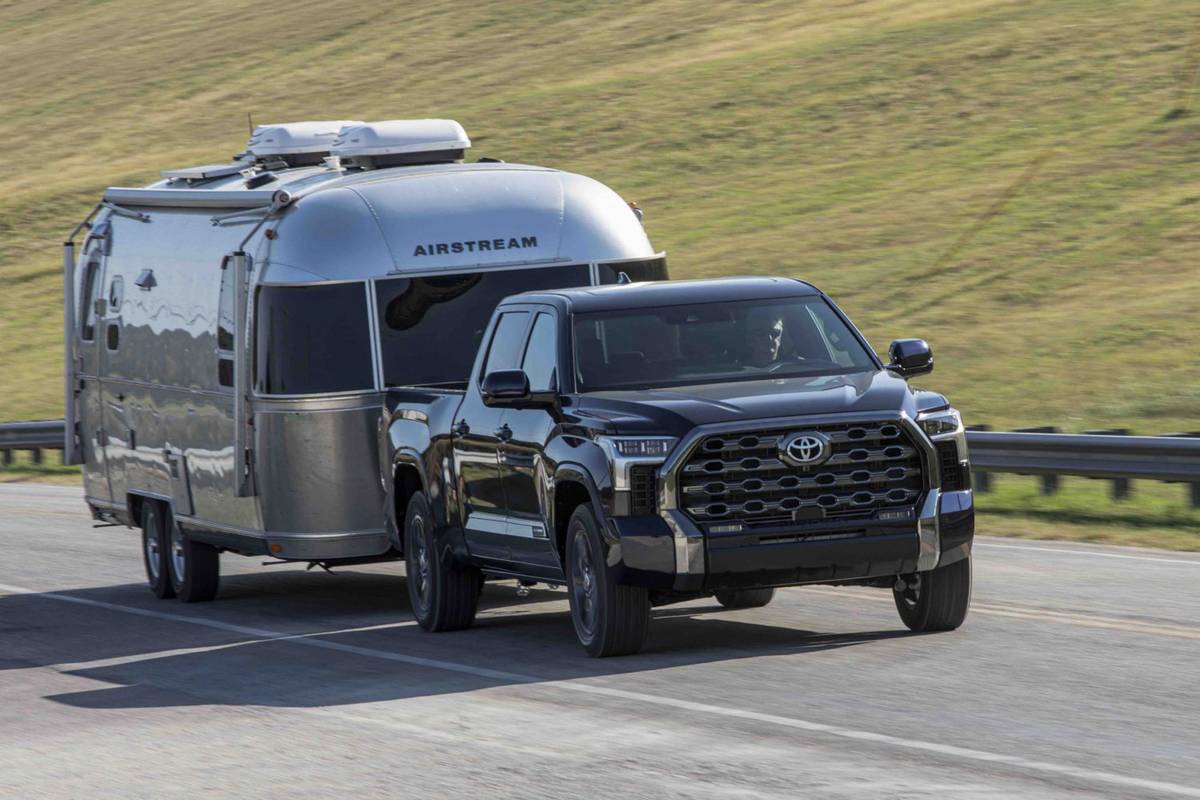
When it comes to towing capacity, the Toyota Tundra is a force to be reckoned with. Whether you need to pull heavy equipment on the job site or hitch up a trailer for a weekend getaway, the Tundra has you covered. In this article, we will explore the towing capabilities of various Toyota Tundra models and provide you with all the information you need to make an informed decision.

Tauris – A Truck for All Your Towing Needs

The Toyota Tundra offers different models, including the SR, Limited, and Platinum, each with its own towing capacity. The exact towing capacity may vary depending on the model, but the Tundra can tow up to an impressive 10,100 pounds. Whether you’re hauling a boat, RV, or heavy load, the Tundra is up to the task.


How Much Can a Toyota Tundra Tow

Credit: www.newboldtoyota.com

Towing Capabilities by Model

Here is a breakdown of the towing capabilities of each Toyota Tundra model:

Model Towing Capacity
SR 9,400 lbs
Limited 9,800 lbs
Platinum 10,100 lbs

As you can see, all models of the Toyota Tundra offer impressive towing capabilities. Whether you choose the SR, Limited, or Platinum, you can tow with confidence knowing that your Tundra has the power to get the job done.

How Much Can a Toyota Tundra Tow

Credit: www.cars.com

Toyota Tundra – Built for Towing

The Toyota Tundra is designed with towing in mind. With features such as a powerful V8 engine and a durable frame, the Tundra is built to handle heavy loads. Additionally, the Tundra offers advanced towing technologies to make towing safer and more convenient.

Towing Features

  • Trailer-Sway Control: Helps maintain stability when towing by automatically applying brake pressure to individual wheels.
  • Integrated Trailer Brake Controller: Allows you to control the trailer’s brakes directly from the cabin.
  • Towing Mirrors: Extendable mirrors provide better visibility when towing wide or long loads.
  • Tow/Haul Mode: Optimizes transmission shifts for improved towing performance.

With these features and more, the Toyota Tundra ensures a smooth and safe towing experience.

Frequently Asked Questions For How Much Can A Toyota Tundra Tow

Is Toyota Tundra Good For Towing?

The Toyota Tundra is an excellent choice for towing. It has a strong and capable engine, allowing it to tow heavy loads with ease. With a towing capacity of up to 10,100 pounds, you can confidently tow trailers, boats, or other equipment.

The Tundra’s sturdy build and advanced towing features ensure a safe and efficient towing experience.

How Much Weight Can A 5.7 Tundra Pull?

The 5. 7 Tundra has a towing capacity of up to 10,100 pounds. It is a powerful pickup truck that can handle heavy loads. Enjoy the convenience and capability of towing with the Toyota Tundra.

Which Tundra Can Tow 10,000 Lbs?

The Toyota Tundra with the 5. 7L V8 engine can tow up to 10,000 lbs.

Conclusion

The Toyota Tundra is a reliable and capable truck that can handle all your towing needs. With its impressive towing capacity and advanced towing features, the Tundra offers both power and convenience. Whether you’re towing for work or leisure, the Tundra is up to the task.

So, if you’re in the market for a truck that can tow heavy loads with ease, look no further than the Toyota Tundra. With its reputation for durability and reliability, the Tundra is a top choice for truck enthusiasts and professionals alike. Visit your local Toyota dealership today to experience the power of the Tundra firsthand.

How to Reset Toyota Camry Maintenance Light


How to Reset Toyota Camry Maintenance Light? To reset the Toyota Camry maintenance light, push and hold the odometer button on the dashboard and turn the key to position two. Keep holding the button until the maintenance light starts flashing and then release it.

How to Reset Toyota Camry Maintenance Light

To reset the maintenance light on a Toyota Camry, follow these general steps, which may vary slightly depending on the model year of your Camry:

  1. Turn Off the Engine: Ensure the engine switch is off with the trip meter A reading shown.
  2. Enter the Correct Display: While pressing the trip meter reset knob, turn the engine switch to the “IGNITION ON” mode without starting the engine. For models with a start button, press the “Start” button twice without touching the brake pedal to enter the “ON” mode.
  3. Reset the Light: Continue to press and hold the trip meter reset knob until the trip meter displays “000000”. This indicates that the maintenance light reset process has been initiated.
  4. Wait for the Light to Flash: The maintenance light should start to flash, and you may hear a beeping sound. This indicates that the system is resetting.
  5. Release the Button and Start the Car: Once the maintenance light is off, release the odometer button and turn the key to start your car or, for push-button start models, press the “Start” button to start the engine.
  6. Check the Maintenance Light: The maintenance light should be off once your Camry starts. If it’s still on, you may need to repeat the process once or twice more.

These steps are a general guide and may vary slightly depending on the specific model year of your Toyota Camry. Always refer to your vehicle’s owner’s manual for the most accurate and detailed instructions tailored to your specific model.

How to Reset Toyota Camry Maintenance Light

Frequently Asked Questions

How Do You Reset The Maintenance Required Light On A Toyota Camry?

To reset the maintenance required light on a Toyota Camry, press and hold the odometer button on the dashboard while turning the key to position two. Continue holding until the maintenance light starts to flash and then release. The light should go out.

How Do You Reset The Maintenance Light On A Toyota?

To reset the maintenance light on a Toyota Camry, follow these steps: Push and hold the odometer button on the dashboard, turn the key to position two, and keep holding the button until the maintenance light flashes. You may hear beeping noises.

The light should turn off.

How Do You Reset The Maintenance Light On A 2012 Camry?

To reset the maintenance light on a 2012 Camry, press and hold the odometer button on the dashboard, then turn the key to position two. Continue holding the button until the maintenance light flashes and goes out.

Conclusion

To sum up, resetting the maintenance light on your Toyota Camry is a straightforward process that can easily be accomplished at home. By following the steps outlined in this guide, you can save both time and money by avoiding unnecessary trips to the dealership.

Keeping up with maintenance is crucial for the longevity of your vehicle, and with the knowledge provided here, you can now easily tackle this task on your own.

Best Hyundai Showroom in Gurgaon


When looking for the best Hyundai showroom in Gurgaon, it is essential to consider factors such as customer service, vehicle range, after-sales support, and overall reputation. A top-rated showroom will provide a wide selection of Hyundai models, offer excellent customer service from knowledgeable staff, and have a strong service center for maintenance and repairs. Additionally, positive reviews and recommendations from previous customers can help in choosing the best Hyundai showroom in Gurgaon.

Choosing the right Hyundai showroom can make a significant difference in the overall car buying experience. By researching and visiting different showrooms in Gurgaon, customers can find one that meets their needs and provides a high level of service and support. It is also advisable to inquire about any ongoing promotions, discounts, or special offers that may be available at the showroom to get the best deal on a new Hyundai vehicle.

Unmatched Customer Service

high quality customer service experience

The Hyundai showroom in Gurgaon sets a high standard with its unmatched customer service, offering you a personalized and seamless experience from the moment you step in. This establishment has mastered the art of customer satisfaction, ensuring that your needs and preferences are prioritized. They've built a reputation not just on the quality of their vehicles but notably on the excellence of their service.

By incorporating customer feedback into their operations, the showroom demonstrates a commitment to continuous improvement. They understand that your insights provide critical information that can be used to refine their service offerings. This feedback mechanism isn't just a formality; it's a crucial tool that informs service training programs, ensuring that staff aren't only knowledgeable about Hyundai's latest models but are also equipped with the skills to address your queries effectively and empathetically.

Their service training goes beyond the basics. It includes rigorous modules on customer engagement, problem-solving, and personalization techniques. This ensures that every interaction you have isn't only informative but also genuinely enjoyable. The Hyundai showroom in Gurgaon doesn't just sell cars; it sells an experience, one that's crafted carefully with your satisfaction as the cornerstone.

Exclusive Hyundai Deals

Building on their commitment to customer satisfaction, Hyundai's showroom in Gurgaon offers exclusive deals that cater specifically to your needs, ensuring you get unparalleled value from your purchase. These deals aren't just about enticing price tags; they're a complete package designed to reward and retain customers while attracting new ones.

Here's a closer look at what you can expect:

  1. Seasonal Promotions: Hyundai grasps the power of the right timing. Throughout the year, they roll out season-specific deals that might include special financing rates, cashback offers, or discounts on specific models. Whether it's a year-end sale or a festive promotion, these deals are tailored to give you the best bang for your buck at just the right moment.
  2. Loyalty Rewards: For those who've chosen Hyundai time and again, the showroom in Gurgaon offers loyalty rewards. This could mean additional discounts, exclusive access to new models before they hit the broader market, or special servicing rates. It's Hyundai's way of saying 'thank you' for your continued trust.
  3. Tailored Financing Options: Recognizing that one size doesn't fit all, Hyundai provides personalized financing solutions. Whether you're a new-time buyer or looking to upgrade, their team works with you to find the most beneficial financial arrangement.

Hyundai's exclusive deals in Gurgaon are designed with a deep grasp of customer needs and market dynamics, ensuring you always leave with more value than you came for.

Wide Range of Models

capturing text details accurately

Hyundai's showroom in Gurgaon prides itself on offering a diverse lineup of models, ensuring that there's a perfect match for every driver's needs and preferences. When you step into the showroom, you're greeted with the latest releases, each with a detailed breakdown of model specifications. This allows you to make an informed decision, comparing features like fuel efficiency, horsepower, and technological advancements side by side.

The showroom's range covers everything from compact city cars to spacious SUVs, ensuring that whether you're looking for efficiency, luxury, or utility, you'll find a model that fits your criteria. The sales team is well-versed in every vehicle's subtleties, able to guide you through the intricate details of each model's performance, safety features, and customization options.

Moreover, Hyundai's commitment to innovation is evident in the showroom. You'll find hybrid and electric models that represent the latest in automotive technology, offering eco-friendly alternatives without compromising on style or performance. This attention to a wide array of model specifications and the inclusion of the latest releases ensures that you're not just buying a car, but an experience tailored to your lifestyle and values.

Hassle-Free Financing Options

After selecting your ideal model from Hyundai's diverse lineup, you'll find delving into the financing options offered in the Gurgaon showroom to be a smooth and straightforward process. Understanding the importance of your credit score in securing favorable loan terms is essential. A higher credit score not only improves your chances of loan approval but also positions you to receive more attractive interest rates.

Here's what you need to know about the financing process:

  1. Credit Score Evaluation: Initially, the finance team will assess your credit score. This step is pivotal as it determines your eligibility for financing and influences the interest rates you'll be offered. A solid credit score can lower your borrowing costs.
  2. Customized Financing Solutions: Based on your credit score and financial standing, the showroom's finance experts will tailor loan options that best fit your budget and repayment capacity. This personalized approach ensures that you're not overextending financially.
  3. Streamlined Loan Approval Process: The showroom has streamlined its loan approval process to be quick and efficient. By simplifying paperwork and utilizing digital tools, they've reduced wait times, making the path from application to approval as hassle-free as possible.

Navigating through the financing options with this knowledge guarantees you're well-equipped to make informed decisions, leading to a smoother acquisition of your Hyundai vehicle.

After-Sales Support

detailed product assistance available

Once you've secured your Hyundai vehicle, the showroom in Gurgaon guarantees your satisfaction doesn't end at purchase with its thorough after-sales support. You're not just buying a car; you're investing in a relationship that's maintained through exceptional service. The showroom's after-sales support is designed to make sure your Hyundai remains in top condition, with warranty coverage that's both thorough and reassuring. This coverage isn't just a promise; it's a proof of the quality of Hyundai vehicles and the showroom's commitment to your ongoing satisfaction.

You'll receive personalized maintenance tips, tailored to your specific model and driving habits. These tips aren't generic advice; they're strategic insights that can greatly extend the lifespan and performance of your vehicle. From the best timing for oil changes to grasping when your brakes need attention, the showroom's team is on hand to guide you through every aspect of your car's maintenance.

The showroom's after-sales support isn't an afterthought; it's a cornerstone of their service. With a focus on warranty coverage and maintenance tips, they make sure that your Hyundai experience is as reliable and enjoyable years down the line as it was the day you drove off the lot.

Conclusion

To sum up, discovering the top Hyundai showroom in Gurgaon relies on outstanding customer service, exclusive deals, a varied model lineup, seamless financing, and strong after-sales support.

You'll experience unmatched satisfaction with a showroom that prioritizes your needs, offering personalized solutions and a wide range of vehicles.

The right dealership greatly simplifies your purchase path, ensuring you drive off with not just a car, but a commitment to your ongoing satisfaction and a proof of Hyundai's acclaimed reliability.