
Welcome to our guide on how to connect Bluetooth to your Toyota Highlander. With modern technology becoming an integral part of our daily lives, it’s essential to stay connected, even while on the go. Connecting your phone to your Toyota Highlander via Bluetooth can enhance the driving experience by allowing you to make hands-free calls, stream music, and access other useful features. Follow the steps below to easily connect your Bluetooth device to your Toyota Highlander.
Step 1: Prepare Your Phone
Before you begin, ensure that your phone’s Bluetooth feature is turned on. This can usually be found in the settings menu of your smartphone. Once the Bluetooth is activated, your phone will be discoverable by other devices, enabling the pairing process with your Toyota Highlander.
Step 2: Access the Toyota Highlander’s Multimedia System
Enter your Toyota Highlander and start the ignition. The multimedia display screen will power up, providing access to the various entertainment and connectivity features. Locate the “Setup” button on the display and touch it to access the setup menu.

Credit: m.youtube.com
Step 3: Pair Your Phone
Once in the setup menu, locate and select the “Bluetooth” option. Then, choose “Add Device” to initiate the pairing process. At this point, your Toyota Highlander’s multimedia system will begin searching for available Bluetooth devices.
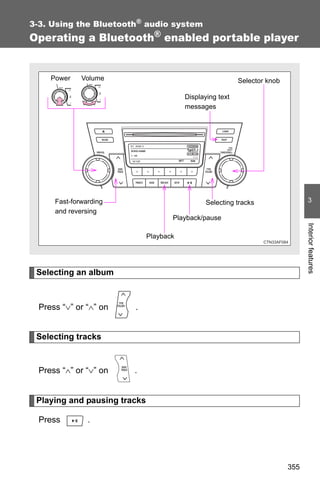
Credit: www.slideshare.net
Step 4: Select Your Phone’s Bluetooth Name
After a moment, your phone’s name should appear on the multimedia screen. Select your phone’s name to begin the pairing process. Your Toyota Highlander and smartphone will now establish a secure connection.
Step 5: Confirm the Pairing Code
At this stage, a pairing code will be displayed on both your phone and the Toyota Highlander’s multimedia screen. Verify that the codes match and confirm the pairing on both devices. This will complete the connection process.
Step 6: Test the Connection
Ensure that the Bluetooth connection is successful by making a test call or playing music from your phone. The sound should now be routed through your Toyota Highlander’s audio system, allowing for hands-free communication and entertainment while driving.
Additional Tips
Here are some additional tips to enhance your Bluetooth experience in your Toyota Highlander:
- Regularly check for software updates for the multimedia system to ensure optimal Bluetooth functionality.
- Consider using voice commands to control your phone’s features through the Toyota Highlander’s multimedia system, enhancing safety while driving.
- Disconnect your phone once you’ve finished driving to preserve battery life and prevent any unwanted access to your device while the car is unattended.
Frequently Asked Questions On How To Connect Bluetooth To Toyota Highlander
How Do I Connect Bluetooth To My Toyota Highlander?
To connect Bluetooth to your Toyota Highlander, go to the settings menu on your vehicle’s touchscreen display. Select the Bluetooth option and turn it on. Then, enable Bluetooth on your smartphone and search for available devices. Select your Highlander’s Bluetooth name and follow the on-screen prompts to complete the pairing process.
What Are The Benefits Of Connecting Bluetooth To My Toyota Highlander?
Connecting Bluetooth to your Toyota Highlander offers several benefits. Firstly, you can make hands-free phone calls, ensuring your safety while driving. Secondly, you can stream music wirelessly from your smartphone or other devices. Additionally, you can use Bluetooth to access features like voice commands, enabling you to control various functions without taking your hands off the steering wheel.
Can I Connect Multiple Devices Via Bluetooth To My Toyota Highlander?
Yes, you can connect multiple devices to your Toyota Highlander via Bluetooth. Once you have successfully paired one device, you can simply repeat the pairing process for additional devices. However, keep in mind that only one device can be actively connected to the Highlander at a time for functions such as phone calls or media streaming.
Conclusion
Connecting Bluetooth to your Toyota Highlander is a straightforward process that can greatly improve your driving experience. By following these steps, you can ensure seamless connectivity between your phone and your vehicle, allowing you to stay safe and entertained on the road. Enjoy the convenience of hands-free calling and wireless audio streaming as you embark on your journeys with your Toyota Highlander.