
If you own a Toyota vehicle with a built-in navigation system, you may encounter issues such as freezing, slow performance, or inaccuracies in the map data. In such cases, performing a reset on your Toyota navigation system can often resolve these issues and get it back to optimal functionality. This guide will walk you through the steps to reset your Toyota navigation system to help you troubleshoot and resolve common problems.
Step 1: Access the Settings
First, start your vehicle and power on the navigation system. Navigate to the “Settings” or “Setup” menu on the touchscreen display. This is typically where you can access various system options and configurations.

Credit: m.youtube.com
Step 2: Select the Reset Option
Once in the Settings menu, look for an option related to resetting or restoring the navigation system. The wording may vary depending on the specific Toyota model, but common choices include “Reset,” “Restore Factory Settings,” or “Initialize.”
Step 3: Confirm the Reset
Before proceeding with the reset, the system may prompt you to confirm your action. This is a safeguard to prevent accidental resets. Follow the on-screen instructions to confirm that you want to reset the navigation system.
Step 4: Allow the Reset to Complete
After confirming the reset, the navigation system will begin the process of rebooting and restoring the original settings. This may take a few moments, so be patient as the system goes through the reset procedure.
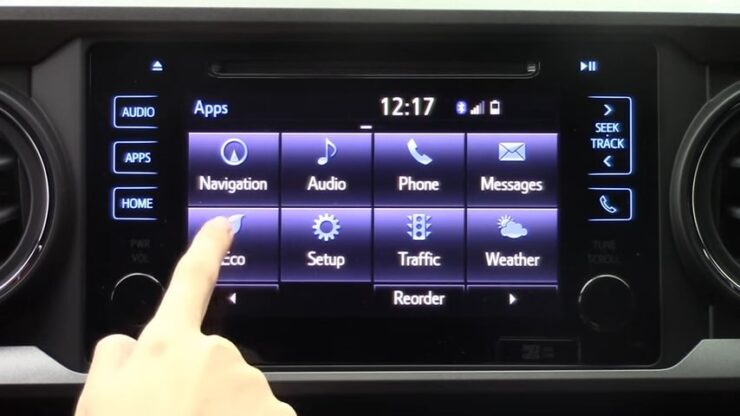
Credit: www.thompsontoyota.com
Step 5: Test the Navigation System
Once the reset is complete, test the navigation system to see if the issues you were experiencing have been resolved. Check for improved responsiveness, accurate map data, and overall smoother performance of the system.
Additional Tips and Considerations
In some cases, a simple reset may not fully address more complex issues with the navigation system. If you are still encountering problems after performing the reset, consider the following additional steps:
- Check for software updates: Manufacturers often release software updates to address bugs and improve the performance of navigation systems. Visit the Toyota website or contact your local dealership to inquire about any available updates for your vehicle’s navigation system.
- Verify GPS signal: Poor GPS reception can lead to inaccuracies in navigation. Ensure that the vehicle is in an open area with a clear view of the sky to optimize GPS signal reception.
- Professional diagnosis: If the issues persist, it may be necessary to have your navigation system inspected by a qualified technician. They can conduct a thorough diagnostic check and provide advanced troubleshooting to identify and resolve any underlying issues.
Final Thoughts
Being able to reset your Toyota navigation system gives you a convenient way to troubleshoot and address common issues that may arise during use. By following the outlined steps and considering additional tips, you can help ensure that your navigation system continues to provide reliable and accurate guidance on your journeys. Remember to refer to your vehicle’s owner’s manual for model-specific instructions and recommendations regarding the navigation system.
Frequently Asked Questions On How To Reset Toyota Navigation System
How Do I Reset The Toyota Navigation System?
To reset the Toyota navigation system, locate the “Menu” button, go to “Settings,” select “System,” and choose “Initialize. “
Will Resetting The Toyota Navigation System Delete My Saved Destinations?
No, resetting the Toyota navigation system will not delete your saved destinations. It only resets the settings and preferences.
Why Is My Toyota Navigation System Not Working After A Reset?
If your Toyota navigation system is not working after a reset, check if the GPS signal is strong, verify the map SD card is inserted correctly, and ensure that the system software is up-to-date.