Recent Posts

How to Replace Hyundai I20 Key Battery


  • Identifying the key fob model is the first step in the process.
  • Gathering necessary tools such as a small screwdriver and a new battery is essential.
  • Carefully opening the key fob without damaging it is crucial to access the battery compartment.

This three-step process ensures a successful replacement of the Hyundai i20 key battery.

Identify Key Fob Model

identifying key fob model

To start, find out your Hyundai I20 key fob model. Hyundai has different key fob designs with specific battery needs. Knowing your model helps you begin correctly.

First, look at the key fob's shape and button count. These features help identify the model.

Then, check for model numbers or identifiers on the key fob, usually found on the back or under a panel.

You can also check your vehicle's manual for the key fob model. If you don't have the manual, Hyundai's website or customer service can tell you the model based on your car's details.

Gather Necessary Tools

To replace the battery in your Hyundai I20 key, you need a small flathead screwdriver and a new CR2032 battery. These are essential for opening the key fob without damage and replacing the battery correctly.

Before starting, ensure you have:

  • A small flathead screwdriver: It's used to open the key fob.
  • A CR2032 battery: This is the replacement battery needed.
  • A soft cloth (optional): Useful for cleaning the battery area and the new battery for a better connection.

Having these items ready makes the replacement process easier and prevents problems.

Open the Key Fob

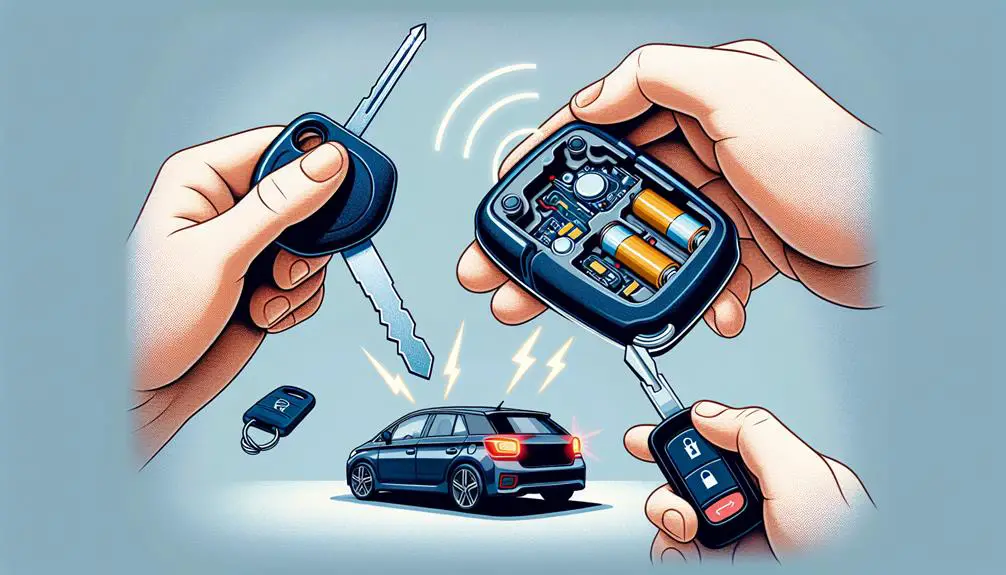
unlock car with fob

First, insert the edge of a small flathead screwdriver into the key fob's seam. Find the right spot to use gentle pressure to open it. You should not force it, but gently pry it apart. Once it starts to open, do not pull it apart quickly. Instead, move the screwdriver around the edge to separate the halves slowly. Be careful not to damage the fob. The aim is to replace the battery, not to replace the key fob.

Here is a simplified table of the key steps:

Step Tool Needed Caution
1. Insert Screwdriver Small flathead Do not use too much force
2. Pry Open Same flathead Go around the edge
3. Separate Halves Your hands Do not yank apart

After opening the fob, do not immediately remove the battery. First, look at how everything is placed inside. Remembering the placement of small components is important for reassembly after changing the battery.

Replace the Battery

First, take out the old battery from the key fob. Remember how it was placed because you need to put the new battery in the same way. The wrong placement can stop the key fob from working. Usually, you need a CR2032 battery, but check the old battery to be sure.

When putting in the new battery:

  • Make sure the positive side, which has a + sign, is facing the right way as shown inside the key fob.
  • Try not to touch the new battery with your fingers. Oils from your skin can damage it. Use plastic tweezers if you can.
  • Before putting in the new battery, look for any damage or dirt in the battery area. Clean it if needed.

Reassemble and Test

reassemble and test equipment

After putting the new battery in your Hyundai I20 key fob, join the two halves carefully. Make sure they fit well without forcing them. Press gently until they click together.

Then, test the key fob. Stand near your Hyundai I20 and press the unlock button. If the doors unlock, the battery replacement and reassembly are successful. Also, try the lock button and trunk release to check if everything works.

If the key fob doesn't work, check the battery's position first. It might be upside down. Open the key fob and make sure the positive (+) side of the battery is facing up. If the battery is in correctly and the key fob still isn't working, the battery mightn't be seated properly or could be faulty.

Conclusion

You did a great job changing the battery in your Hyundai i20 key!

First, you found out what kind of key fob you have. Then, you got the tools you needed, opened the key fob carefully, and put in a new battery.

Make sure you put it back together right and check if it works. This way, you've saved time and maybe even money you'd have spent at the car dealership.

Good job!

Toyota Sienna Security Indicator Light


The Toyota Sienna Security Indicator Light is a vital part of the security system, indicating its operational status for maintaining security integrity. It illuminates when the system is active, alerting to unauthorized entry attempts or system malfunctions. Understanding dashboard indicators is crucial for prompt action. Different colors and behaviors convey security conditions like activation, alarm, or deactivation. Common reasons for activation include key recognition issues and faulty sensors. Troubleshooting involves diagnosing, reprogramming keys, and seeking professional assistance. For a detailed understanding of this indicator and preventive maintenance tips, exploring further will provide valuable insights into ensuring the security system's effectiveness.

What is the Toyota Sienna Security Indicator Light?

The Toyota Sienna Security Indicator Light, a key element of the vehicle's security system, signals the system's operational status. When this light illuminates on the dashboard, it indicates the security system is active.

Drivers should monitor this light for any changes that could signify security issues. Prompt attention to these signals is crucial for maintaining the vehicle's security integrity.

Understanding dashboard indicators, including the security light, is vital for safeguarding the Toyota Sienna.

Why Does the Security Indicator Light Come On in My Toyota Sienna?

The Toyota Sienna Security Indicator Light illuminates due to specific security events. Key reasons include unauthorized entry attempts, security system malfunctions, or key fob issues. The light warns of potential security breaches.

Immediate action is necessary to secure the vehicle. Persistent illumination suggests a critical problem needing expert examination.

How to Interpret the Toyota Sienna Security Indicator Light

Decoding the Toyota Sienna Security Indicator Light involves recognizing various signals it emits. The light's color and behavior indicate the vehicle's security condition. Here's a simplified guide:

Light Color Behavior Interpretation
Red Constant System activated
Red Flashing Alarm activated
Green Constant System deactivated
Off N/A System inactive

This concise guide assists Toyota Sienna owners in quickly understanding their vehicle's security state.

Common Reasons for the Toyota Sienna Security Indicator Light to Activate

When the Toyota Sienna Security Indicator Light activates, it can signal key recognition issues, problems with the immobilizer system, faulty wiring, or sensors, or even battery problems affecting the security system.

These common reasons may require diagnostics by a qualified technician to pinpoint and address the underlying cause for the activation of the security indicator light.

Understanding these potential issues can help Toyota Sienna owners address security concerns promptly and effectively.

Key recognition issues

The Toyota Sienna Security Indicator Light may turn on due to key recognition problems. These problems can stem from a few sources:

  • A depleted key fob battery
  • Damage to the key fob
  • Electronic device interference
  • Incorrect key fob programming
  • The vehicle's immobilizer system not recognizing the key

To prevent these issues, ensure the key fob is undamaged, the battery is charged, and the key is correctly programmed as per the manufacturer's instructions. If the Security Indicator Light remains on, seek assistance from a certified technician for diagnosis and repair.

Problems with the immobilizer system

Faults in the Toyota Sienna's immobilizer system often trigger the Security Indicator Light. This system, crucial for preventing unauthorized engine activation, relies on a correct key's transponder chip and an operational immobilizer unit.

Faulty chips or a malfunctioning unit can illuminate the indicator, leading to start-up failures or engine shutdowns soon after ignition.

Immediate inspection and repair by a skilled technician are necessary to maintain vehicle security and functionality.

Faulty wiring or sensors

The Toyota Sienna's Security Indicator Light might illuminate due to faulty wiring or defective sensors in the vehicle's security apparatus.

Faulty wiring disrupts communication among security components, triggering the indicator. Defective sensors, such as door or motion detectors, can falsely activate the indicator.

Loose, corroded, or damaged wiring connections impair the security system's functionality, causing the indicator to light up. Regular maintenance of wiring and sensors is crucial to prevent false alarms and ensure efficient operation of the security system.

Battery problems affecting the security system

Battery problems frequently activate the Toyota Sienna's Security Indicator Light, affecting the vehicle's security system. A weak or failing battery creates voltage fluctuations, which the security system mistakenly perceives as a security risk, lighting up the Security Indicator Light as a warning.

Furthermore, insufficient battery power compromises the functionality of security components like the alarm or immobilizer, potentially causing operational failures. Regular battery checks and maintenance are crucial for preventing these issues and ensuring the security system functions effectively.

Troubleshooting the Toyota Sienna Security Indicator Light

When the Toyota Sienna Security Indicator Light illuminates, troubleshooting becomes essential.

Steps to diagnose the issue, trying to reprogram your key, and checking the battery and connections are key points to address.

Understanding these aspects can help determine the root cause of the indicator light activation.

Steps to diagnose the issue

When the Toyota Sienna Security Indicator Light blinks rapidly while the vehicle is off, it suggests a possible unauthorized entry attempt. First, confirm all doors, the hood, and the trunk are fully closed.

If the light continues, test with an alternate key, as the problem may stem from the key itself. Check the key fob's battery; a depleted battery can activate the security light.

Should these steps not rectify the issue, consulting a certified Toyota technician for a thorough diagnosis and solution is advisable.

When to try reprogramming your key

Consider reprogramming your Toyota Sienna key when you encounter issues with the Security Indicator Light. If this light flashes or remains lit using a functional key, reprogramming may solve the problem. This process aligns the key's code with the car's security system, ensuring they communicate correctly.

Check the vehicle's manual or seek professional advice before reprogramming. This step, often straightforward, addresses Security Indicator Light troubles effectively, avoiding more complex solutions.

Checking the battery and connections

To diagnose the Toyota Sienna Security Indicator Light, first inspect the battery terminals for corrosion and ensure they are secure. Corroded or loose terminals can interrupt the electrical supply to the security system, activating the indicator.

Then, assess the battery's charge capacity. A deteriorating battery may lead to voltage instability, potentially triggering the security light.

Also, scrutinize the wiring connections to the security system for damage or disconnections. Rectifying issues with the battery and connections can efficiently mitigate Security Indicator Light problems.

How to Reset the Toyota Sienna Security Indicator Light

Resetting the Toyota Sienna Security Indicator Light can be done following a simple step-by-step guide, ensuring the system returns to normal operation.

However, in cases where the issue persists or seems complex, it is advisable to seek the expertise of a professional diagnostic service to accurately pinpoint and address the problem.

This proactive approach can help prevent potential security or operational issues with the vehicle.

Step-by-step guide

Step 1: Ensure the vehicle is securely parked and the engine is turned off.

Step 2: Insert the key into the ignition.

Step 3: Turn the key to the 'On' position without starting the engine. Wait for the security light to start blinking and then turn off.

Step 4: Turn the key back to the 'Off' position.

Step 5: Repeat Steps 2 to 4 two more times, making it a total of three cycles.

Step 6: Start the engine to check if the security indicator light has been successfully reset.

Step 7: If the light persists, consider further troubleshooting or seeking professional assistance.

When a professional diagnostic is advisable

Consulting a professional technician is essential if you are unable to reset the Toyota Sienna Security Indicator Light after following the standard steps.

Experts possess the necessary skills and tools to thoroughly investigate the issue, uncovering any hidden faults that may keep the light active.

They can conduct detailed diagnostics to identify the root cause, be it a defective sensor, a wiring problem, or a malfunction in another component.

This approach ensures the security indicator light is accurately reset, addressing any potential security risks or faults effectively.

Prioritize your safety and vehicle security by seeking expert assistance.

Preventing Future Issues with Your Toyota Siennas Security System

To ensure the optimal functioning of your Toyota Sienna's security system, it is crucial to adhere to regular maintenance schedules and inspections.

Using genuine parts and keys recommended by the manufacturer can significantly reduce the risk of malfunctions and security breaches.

Regular maintenance tips for the security system

Maintain your Toyota Sienna's security system effectively with these essential practices:

  1. Check and replace key fob batteries regularly to avoid access issues.
  2. Clean sensors and cameras to ensure clear visibility and precise detection.
  3. Inspect wiring and connections to avoid malfunctions or electrical issues.
  4. Have a qualified technician perform routine inspections to catch and fix problems early.

Importance of using genuine parts and keys

Ensuring the use of genuine Toyota Sienna parts and keys is crucial for maintaining the vehicle's optimal functionality and security. Genuine parts, designed specifically for the Toyota Sienna, fit perfectly and operate seamlessly, reducing the risk of security system malfunctions.

Authentic keys are vital for the correct operation of the transponder system, protecting against unauthorized access and potential security breaches. Non-genuine parts often fall short of original component standards, leading to compatibility issues or system failures.

Investing in authentic Toyota Sienna parts and keys not only protects against security threats but also enhances the vehicle's lifespan and performance, ensuring reliability on the road.

When to Visit a Professional: Understanding Serious Warnings

When the security indicator light on your Toyota Sienna flashes or remains illuminated, it may be a sign of a serious issue that requires professional attention.

Visiting a mechanic promptly can help diagnose the problem accurately and prevent potential safety hazards down the road.

Understanding the importance of addressing these warnings promptly can ensure the security and functionality of your vehicle.

Signs that indicate a trip to the mechanic is necessary

Monitoring your vehicle for signs that necessitate a mechanic's visit is crucial for its longevity and safety. Here are four major indicators:

  1. Warning Lights: Do not ignore dashboard warning lights. They often signal severe issues that can worsen if not addressed.
  2. Unusual Noises: Sounds like grinding, squealing, or knocking from your vehicle can indicate problems needing urgent attention.
  3. Leaks: Any fluid leaks, including oil, coolant, or brake fluid, under your vehicle are serious. They suggest leaks in vital systems.
  4. Decreased Performance: If starting the engine becomes difficult, power reduces, or fuel efficiency drops, these could point to problems requiring a professional's diagnosis and repair.

What to expect during professional diagnostics and repair

When addressing issues like the Toyota Sienna Security Indicator Light, it's essential to consult experts. These professionals use sophisticated diagnostic tools to identify the problem's root cause accurately. They conduct a detailed examination of the vehicle's electronics, wiring, and all components linked to the security indicator light.

Through careful inspection and testing, they can detect defective sensors, broken security modules, or wiring faults causing the light to activate. Relying on skilled technicians ensures that your Toyota Sienna's complex problems are resolved, maintaining its reliability and safety.

FAQs: Toyota Sienna Security Indicator Light

When the Toyota Sienna security indicator light starts blinking, it can raise concerns for drivers.

Understanding why it blinks, knowing if it's safe to drive with the light on, and discerning between a false alarm and a genuine security issue are common questions that arise.

Addressing these points will help drivers navigate the situation with their Toyota Sienna's security indicator light.

Why does my Toyota Sienna security light keep blinking?

The Toyota Sienna security light blinking persistently may point to an issue within the vehicle's security apparatus. Consider these potential causes:

  1. Break-In Attempt: The blinking light might be alerting you to a recent unauthorized attempt to access the vehicle, activating the security system's alert state.
  2. Sensor Malfunction: A defective sensor could be falsely triggering the security light, suggesting an inspection or replacement is necessary.
  3. Weak Battery: The security light flashing intermittently can indicate a low battery, highlighting the need for a power source evaluation.
  4. System Reset Needed: In some instances, resetting the security system may correct malfunctions causing the light to blink without cease.

This concise explanation removes unnecessary words and focuses on clear, straightforward information, adhering to Hemingway's principles for writing.

Can I drive my Toyota Sienna if the security light is on?

Driving a Toyota Sienna with the security light on requires understanding its implications. The security light signals issues with the vehicle's security system, which might affect its functionality. Before driving, assess the situation for safety. The table below outlines scenarios involving the security light and driving safety.

Scenario Safe to Drive?
Security light on due to false alarm Yes
Security light on indicating a real problem No
Security light continuously on No
Security light flashing rapidly No
Security light on without other issues Yes

Drive only if the security light signals a false alarm or no other issues are present. Otherwise, investigate the problem.

How do I know if its a false alarm or a genuine security issue?

When the Toyota Sienna's security indicator light activates, it's essential to determine whether it's signaling a false alarm or a genuine security concern. Here are steps and signs to guide your assessment:

  1. Verification: Check if there's an obvious reason for the alarm, such as a door not fully closed or an object on the seat triggering the sensor. This step can quickly help identify false alarms.
  2. Consultation: Review the vehicle's manual or contact the dealership for insights on common triggers of the security indicator. This knowledge can aid in distinguishing between normal operation and actual threats.
  3. Observation: Monitor the car for any unusual activities or signs of tampering. Genuine issues might include visible damage or the car behaving erratically (e.g., lights flashing without cause).
  4. Action: If a genuine security issue is suspected, take immediate steps to resolve it, such as contacting security professionals or the police. Addressing real concerns promptly can prevent potential harm or loss.

Conclusion

The Toyota Sienna Security Indicator Light plays a vital role in vehicle safety, signaling potential security breaches or malfunctions. Recognizing the reasons behind its activation, including key system errors or unauthorized vehicle entry attempts, is essential for timely troubleshooting.

Drivers should familiarize themselves with this indicator's functions and promptly address any alerts to maintain their Sienna's security. Proactive measures, such as regular maintenance checks, alongside immediate consultation with automotive professionals upon unusual indicator behavior, are key strategies for safeguarding the vehicle.

How Much Is a Catalytic Converter for a Hyundai Tucson


The cost of a catalytic converter for a Hyundai Tucson can vary widely depending on the choice between OEM or aftermarket parts, and the model year of the vehicle.

Factors such as the part's quality and its effect on vehicle performance and longevity are crucial to consider before making a decision.

Factors Influencing Cost

factors impacting project expenses

The cost of a catalytic converter for your Hyundai Tucson can vary widely, depending on several key factors. Initially, the model year of your Tucson plays a significant role. Newer models might require more advanced, and accordingly, more expensive converters because of stricter emission standards. Additionally, the material composition of the converter affects its price. Converters made with precious metals like platinum, palladium, and rhodium tend to be pricier. The availability of these metals in the market can result in price fluctuations.

Another important factor is if you're opting for an OEM (Original Equipment Manufacturer) or aftermarket converter. OEM converters are typically more expensive but ensure a perfect fit and performance as per manufacturer specifications. Aftermarket converters, while usually more affordable, vary in quality and may not always meet your Tucson's specific needs.

To end, labor costs can't be ignored. The complexity of the installation process can impact how much you'll pay for labor. Some vehicles might require more time and effort to replace the catalytic converter, influencing the total cost. Always consider these factors when budgeting for a new catalytic converter for your Hyundai Tucson.

Average Price Range

Depending on the factors previously discussed, you'll find that the cost of a catalytic converter for your Hyundai Tucson generally falls within a broad price range. Typically, you're looking at a spectrum that starts around $150 for the most basic options and can soar up to $2,500 for high-end models. This wide range is influenced by several aspects including the model year of your Tucson, its engine type, and whether the converter is designed for the front or rear exhaust system.

It's important to understand that this price doesn't cover the labor costs, which can also vary significantly based on your location and the mechanic's rates. On average, you might spend an additional $70 to $130 per hour for installation. Given that replacing a catalytic converter can take between 1 to 3 hours, this means labor could add another $70 to $390 to your total bill.

OEM Vs Aftermarket Options

choosing car replacement parts

When considering a new catalytic converter for your Hyundai Tucson, you'll face a choice between OEM and aftermarket options. It's important to understand the differences to make an informed decision that suits your needs and budget.

OEM (Original Equipment Manufacturer) converters are designed by Hyundai, ensuring a perfect fit and best performance for your Tucson. They're typically more expensive, but you're paying for reliability and a guarantee that the converter meets the manufacturer's specifications.

Aftermarket options, on the other hand, are produced by alternative companies and can offer a more cost-effective solution. However, compatibility and quality can vary.

To help you weigh your options, consider the following:

  1. Price: Aftermarket converters are generally less expensive than their OEM counterparts, making them attractive for those on a tight budget.
  2. Quality and Reliability: OEM converters are made to Hyundai's exact specifications, offering peace of mind regarding fit and function.
  3. Variety: Aftermarket providers offer a wider range of options, potentially giving you more flexibility regarding pricing and features.

Choosing between OEM and aftermarket catalytic converters for your Hyundai Tucson depends on your priorities: cost savings, exact fit, or perhaps a balance of both.

Installation Considerations

After deciding between an OEM and aftermarket catalytic converter for your Hyundai Tucson, it's important to contemplate the installation process. Whether you're planning to tackle the job yourself or hire a professional, there are several key factors you'll need to think about.

DIY Installation Professional Installation
Requires specific tools Typically more costly
Time-consuming Guarantees expertise
Risk of improper installation Often includes a warranty
Learning opportunity Saves you time
May void some warranties Peace of mind

Installing a catalytic converter isn't just about the physical act of replacing the part. You'll also need to think about the tools and knowledge required for the job. If you're doing it yourself, make sure you have the right equipment and a solid knowledge of your Tucson's exhaust system. However, keep in mind that a professional installation, while more expensive, comes with expertise and often a warranty that can provide additional peace of mind.

Choosing between DIY and professional installation isn't just a matter of cost but also time, skill level, and the potential impact on your vehicle's warranty. Weigh these factors carefully to make sure you make the best decision for you and your Hyundai Tucson.

Finding the Best Deal

analyzing discounts for shoppers

To make sure you're getting the most value for your money, it's significant to compare prices and services before purchasing a catalytic converter for your Hyundai Tucson. Finding the best deal isn't just about the lowest price; it's about the quality of the product, the warranty offered, and the reputation of the seller. To guarantee you're making a wise choice, consider these steps:

  1. Research Reputable Sellers: Start by looking for sellers with positive reviews and good customer feedback. This can be through online marketplaces, auto parts stores, or directly from manufacturers.
  2. Compare Prices and Warranties: Once you've identified a few reputable sellers, compare their prices for the catalytic converter you need. Don't forget to check the warranty terms. A longer warranty might justify a slightly higher price.
  3. Check for After-Sales Support: After-sale support can be significant, particularly if you encounter issues with the product. Choose sellers who offer strong customer service, including easy returns or exchanges.

Conclusion

To sum up, the cost of a catalytic converter for your Hyundai Tucson depends on several factors, including if you opt for an OEM or aftermarket part. On average, prices range greatly, and installation can add to the expense.

To find the best deal, compare options and consider the balance between quality and price. Don't forget to factor in installation costs, as these can influence your final decision. With a bit of research, you'll find the right fit for your budget and vehicle.

How Long Does Hyundai Kona Battery Last


The average lifespan of a Hyundai Kona's battery is subject to various factors, including driving habits and climate.

You might believe the Hyundai Kona's battery can outlast the pyramids, but in the real world, its lifespan is subject to a myriad of factors. From the way you drive to the climates you encounter, each aspect plays a significant role in determining how long your battery will serve you faithfully.

Understanding how to maximize this can save you both time and money. If you're curious about how to extend your Kona's battery life and what to expect when it's time for a replacement, there's more to uncover that could significantly impact your experience.

Understanding Battery Lifespan

optimizing battery performance longevity

To understand how long your Hyundai Kona's battery will last, it's important to know what affects its life. Usually, a Hyundai Kona's battery lasts a long time if it's taken care of properly.

Hyundai gives a warranty for the Kona's battery, showing they trust its quality. For the electric Kona, there's a warranty that covers a lot of miles or years, which gives you an idea of the minimum battery life you can expect. However, many things can influence this.

How you drive matters a lot. If you maintain your car well, follow the service schedule, and drive without putting too much stress on the battery, it will likely last longer. Batteries gradually lose their ability to hold a charge over time, rather than stopping suddenly.

Factors Affecting Battery Longevity

Several factors affect the life of a Hyundai Kona's battery, including:

  1. Driving Habits: Short trips and aggressive driving can decrease battery life because the battery doesn't fully recharge and is under more strain.
  2. Temperature Extremes: High temperatures can damage the battery by causing fluid to evaporate. Cold temperatures can reduce the battery's ability to charge and discharge.
  3. Charging Patterns: Overcharging or always charging to 100% can reduce the battery's capacity over time. Letting the battery charge drop too low regularly is also harmful.
  4. Vehicle Maintenance: Not maintaining your car can drain the battery. A bad alternator can overcharge the battery, and a faulty starter may use more power, shortening battery life.

Average Lifespan of Kona's Battery

9 years of battery

The Hyundai Kona's battery usually lasts between 8 to 10 years, but this can change depending on driving habits and charging frequency. Hyundai provides a warranty for the Kona's battery, but often the battery lasts longer than the warranty period. Here's a simple table about the Hyundai Kona's battery life:

Factor Impact Detail
Charging Habits High Often fully charging can shorten lifespan.
Driving Style Moderate Rough driving can harm the battery.
Climate High Very hot or cold weather can damage the battery.
Usage Frequency Moderate Not using enough or using too much can affect life.
Warranty Period Low Usually 8 years, but not a lifespan indicator.

Maximizing Your Battery's Life

To make your Hyundai Kona's battery last longer, follow these steps:

  1. Limit Fast Charging: Use fast charging only when needed. Regular charging is better for the battery's health.
  2. Keep Charge Level Moderate: Try to keep the battery charge between 20% and 80%. Avoid fully charging to 100% or letting it drop to 0% often.
  3. Avoid Extreme Temperatures: Keep your car in shaded areas during hot days and warm it up while plugged in during cold days to protect the battery.
  4. Check Battery Health Often: Use your car's tools or get a professional check-up to spot any battery issues early.

Warranty and Replacement Insights

product warranty and replacement

Hyundai provides a strong warranty for the Kona's battery, offering protection for 10 years or 100,000 miles. If the battery capacity drops below 70% within this time, Hyundai will replace it at no cost. However, getting a new battery outside the warranty can be expensive. Prices are decreasing due to technology improvements and higher production, but it's important to think about your vehicle's value before buying a new battery after the warranty ends.

To prevent unexpected costs, follow Hyundai's maintenance advice and regularly check your battery's condition. Early detection of problems can avoid bigger issues later.

Hyundai is also focused on improving battery life and performance for better sustainability and environmental benefits. Owners can feel secure with Hyundai's warranty and their efforts for a sustainable future.

Conclusion

To sum it up, how long your Hyundai Kona's battery lasts depends on a few things, but it should last a long time if you take care of it. Knowing what makes a battery last longer and doing things like regular check-ups can help a lot.

Also, don't forget to check your warranty for extra safety. If you look after your Kona's battery well, it will keep your car going for many years.

How to Turn off Backup Camera Hyundai Tucson


To turn off the backup camera in a Hyundai Tucson, navigate through the vehicle's infotainment system settings.

In an era where horse-drawn carriages are seen as a quaint oddity, understanding the modern technology of your Hyundai Tucson may seem daunting. If you're aiming to disable the backup camera, you need to delve into the car's infotainment system. This process starts with a tap on the touchscreen, leading to various settings and options that could bewilder even tech-savvy individuals.

You might wonder why someone would choose to turn off such a helpful feature and how to ensure it's done correctly. Continue reading to discover both the reasons and the methods for this adjustment.

Understanding Your Vehicle's Settings

exploring vehicle technology features

Before diving into the specifics of turning off your Hyundai Tucson's backup camera, it's significant you're familiar with your vehicle's settings and how to navigate them. Hyundai has equipped the Tucson with a range of customizable settings to improve your driving experience, allowing you to personalize features according to your preferences. Comprehending these settings is the initial step to ensuring you can modify the backup camera functionality.

Your Hyundai Tucson's settings are vital to its operation, influencing everything from safety features to entertainment options. They're designed to be user-friendly, but taking the time to get to know them can make a substantial difference in how well you can tailor your vehicle to meet your needs. You'll find that adjustments can be made not just for the backup camera, but for a variety of other functions as well.

Getting comfortable with the settings menu is critical. While the specifics of accessing and browsing this menu will be covered later, know that it's through this interface you'll be able to personalize your driving experience. Whether you're looking to adjust the sensitivity of your vehicle's sensors, change the language of the dashboard display, or turn off the backup camera, it all starts with a solid comprehension of where these options are located and how they can be adjusted.

Accessing the Infotainment System

To access your Hyundai Tucson's infotainment system, start by pressing the power button located on the system's console. This action will awaken the system from its slumber, revealing a vibrant display that serves as your gateway to a variety of functionalities. Your vehicle's infotainment system is not just about entertainment; it's a hub for settings and preferences that make your driving experience uniquely yours.

Once powered on, you'll notice the system's home screen displaying different icons and menus. It's here where you begin on the voyage of customizing and controlling features within your vehicle. However, before we explore to specific settings, such as the backup camera options, let's familiarize you with the basic components you'll interact with on this screen. Here's a quick guide:

Feature Icon Appearance Primary Function
Radio Antenna Access to AM/FM radio
Media Musical Note Play media from connected devices
Navigation Map Symbol GPS and Maps
Settings Gear Vehicle & system settings
Phone Telephone Bluetooth connectivity for calls

Comprehending these icons and their functions is important as they are the building blocks of your interaction with the Hyundai Tucson's infotainment system. Remember, this is just the beginning. As you become more familiar with the system, you'll find it easier to customize settings, including those related to your backup camera. For now, take your time exploring these fundamental features.

Navigating to Camera Settings

adjusting camera settings efficiently

Once you're comfortable with the basic functions of your Hyundai Tucson's infotainment system, it's time to explore adjusting your backup camera settings.

Heading to the camera settings isn't as intimidating as it might sound. Start by turning on your vehicle's ignition—there's no need to start the engine fully if you're just adjusting settings. Next, tap the infotainment screen to wake it up from any sleep mode it might be in. You'll see a range of icons representing different functions of your Tucson's system.

Look for the 'Settings' icon, which usually resembles a gear or wrench, and tap it. This action opens a menu with several options, each controlling a different aspect of your vehicle's numerous features. From here, scroll through the list until you find the 'Camera' option. It might be grouped under a broader category such as 'Vehicle Settings' or 'Safety Settings,' depending on your Tucson's year and model.

Tapping on 'Camera' will bring you to a new menu specifically focused on camera settings. This menu allows you to adjust different aspects of your backup camera's functionality, such as brightness, contrast, and, in some models, the angle or tilt of the camera view. Remember, each Hyundai Tucson model might've slightly different menu paths because of variations in the infotainment system's design and software.

Deactivating the Backup Camera

If you're looking to deactivate your Hyundai Tucson's backup camera, moving through the settings menu is your starting point. This process can seem a bit intimidating at first, but it's pretty straightforward once you know the steps to follow. Here's a quick guide to help you navigate through the process with ease.

To make sure you don't miss anything, here's a simple list of steps to follow:

  • Access the Main Menu: Start by accessing the infotainment system's main menu on your dashboard screen.
  • Navigate to Settings: From the main menu, find and select the ‘Settings' option. This might require scrolling through a few options depending on your model.
  • Select Camera Settings: Within the settings menu, look for an option labeled ‘Camera' or something similar. This is where you'll find the controls related to your backup camera.
  • Find the Backup Camera Options: Once in the camera settings, search for the backup camera options. This might be labeled as ‘Rear Camera', ‘Backup Camera', or ‘Reverse Camera' settings.
  • Deactivate the Camera: Here, you should see an option to turn off or disable the backup camera. Select this option to deactivate the camera.

Confirming Changes and Testing

analyzing verifying modifying testing

After deactivating the backup camera, it's crucial to double-check your settings to make sure the changes have been saved correctly. You wouldn't want to assume it's off, then find out it's still operational when you're backing up. So, take a moment to navigate back through your Hyundai Tucson's menu to the backup camera settings. If everything's done right, the option to activate the camera should now be off or grayed out, indicating that the change is in effect.

Next up, it's time to physically test that your backup camera is indeed off. Start your Tucson and shift it into reverse. Normally, your display screen would automatically switch to show the camera's view. If you've successfully turned off the backup camera, this won't happen. Instead, your display will either remain on its default screen or turn black, depending on your model's specific settings.

If for some reason the camera view still pops up, don't fret. It's possible that a step was missed or not properly saved. Simply repeat the deactivation process, paying close attention to each step. Remember, it's also worth checking if your vehicle requires a restart for changes to take effect.

Lastly, keep in mind that while you've opted to turn off your backup camera, it can be reactivated at any time should you decide you want it back on. Just reverse the process, and you'll have your camera up and running again. This flexibility guarantees that your driving experience always meets your current preferences and needs.

Conclusion

You've now learned how to disable your Hyundai Tucson's backup camera by delving into your vehicle's settings, accessing the infotainment system, and finding the camera settings.

After deactivating the camera and confirming your changes, it's important to test to make sure everything's set up to your preference.

Remember, while turning off the backup camera can be useful in certain scenarios, always consider the safety benefits it offers during your daily drives.

Stay safe and enjoy your trip!

How Long Does Hyundai Ioniq Battery Last


The Hyundai Ioniq's battery typically lasts between 8 to 10 years. However, its longevity is influenced by various factors including driving habits and vehicle maintenance.

Hyundai provides a warranty as a reassurance, yet to truly extend the battery's life, understanding and addressing these factors is key.

This involves more than just basic care; diving into the nuances of battery maintenance can significantly impact its durability.

Battery Lifespan Overview

battery longevity and durability

The lifespan of a Hyundai Ioniq battery typically ranges from 8 to 10 years, but this can vary based on how the car is used and maintained. Knowing the battery's lifespan is important for understanding when it may need to be replaced and the overall value and reliability of the vehicle.

Over time, the Ioniq's battery will slowly lose its ability to hold a charge, a common trait among rechargeable batteries. This degradation occurs gradually, meaning the battery won't suddenly fail but will slowly offer less driving range.

The term 'lifespan' of the battery doesn't only refer to its total operational life but also to its performance. As the battery ages, the Ioniq may not achieve the same distance on a full charge as it did when new, which is a normal part of the battery aging process.

Key Influencing Factors

To make your Hyundai Ioniq battery last longer, pay attention to these factors:

  1. Driving Style: Drive gently. Avoid fast starts and stops to reduce battery stress.
  2. Charging Habits: Don't always charge to 100% or let the battery fully drain. Keeping the charge between 20% and 80% is better for the battery.
  3. Temperature: Keep your car away from extreme heat or cold. Use a garage or shade in the heat and a battery heater in the cold to protect the battery.

Hyundai's Warranty Coverage

comprehensive hyundai warranty coverage

Hyundai offers a strong warranty for the Hyundai Ioniq, especially for the battery. The original owner gets a lifetime battery warranty. This means Hyundai will replace the battery for free if it can't hold a charge or loses a lot of its capacity. This shows Hyundai's confidence in their battery technology.

If the car is sold, the warranty changes. The new owner gets a 10-year or 100,000-mile warranty, whichever comes first. This is still good for second-hand buyers and keeps the Ioniq appealing in the used market.

The warranty covers the battery if its capacity drops below about 70% of its original capacity. This standard ensures the Ioniq will work well for a long time. Knowing this warranty information can help Ioniq owners worry less about battery issues.

Extending Battery Life

To keep your Hyundai Ioniq's battery in good shape, follow these tips:

  1. Charge Smartly

Don't charge your battery to 100% every day if you don't need to. Also, avoid letting it go down to 0% before charging again. Try to keep the charge between 20% and 80%. This helps avoid damage from extreme charging levels.

  1. Watch the Temperature

Keep your car away from very hot or very cold temperatures when you can. Park in the shade or inside during extreme weather. If it's very hot, let your car cool before using a fast charger. This keeps the battery at a good temperature and helps it last longer.

  1. Do Regular Checks

Even though electric cars need less upkeep, still get regular checks. Make sure the car's software is updated and everything is working right. This can help avoid problems that could hurt your battery.

Real-World Owner Experiences

real life car owner stories

Hyundai Ioniq owners often report that their car's battery lasts longer than expected. Many say their cars have gone over 100,000 miles with less than 10% battery capacity loss. This shows Hyundai's good battery technology and the car's efficient system. However, battery life can vary due to driving style, weather, and charging habits.

Some owners notice reduced range in cold weather, but this is common to electric vehicles, not just the Ioniq. The Ioniq's performance improves in warmer weather, which owners like.

Hyundai offers a long warranty for the battery, which gives buyers confidence. Few owners need to use this warranty for battery problems, which encourages people to buy electric vehicles.

Conclusion

The life of your Hyundai Ioniq's battery depends on how you drive and take care of it. Hyundai gives you a strong warranty for the battery, but if you look after your car well, you can make the battery last even longer.

Many people who've this car say that if you take good care of it, the battery works well for a long time. So, remember to take good care of your car and its battery, and you'll enjoy using your Ioniq for many years.