Recent Posts

How Long Does Hyundai Elantra Battery Last


On average, a Hyundai Elantra's battery lasts between 3 to 5 years.

Isn't it curious how we often take the heartbeat of our Hyundai Elantra, its battery, for granted until it whispers its last charge? You've likely pondered just how long you can expect this silent powerhouse to keep your wheels turning.

However, several variables can shorten or extend this timeline. As you ponder the journey ahead, consider how factors like driving habits, climate, and maintenance play pivotal roles in the lifespan of your Elantra's battery.

Stay tuned to uncover how you can maximize this lifespan, recognize the twilight of your battery's life, and navigate the replacement process seamlessly.

Factors Influencing Battery Lifespan

battery life determinants explored

Several factors significantly impact the lifespan of your Hyundai Elantra's battery. Driving habits are crucial. Short trips prevent the battery from fully recharging, reducing its lifespan. In contrast, longer drives can maintain battery health.

The climate also affects battery longevity. High temperatures can cause battery fluid to evaporate, causing damage. Cold weather slows down the chemical reactions needed to start the car, straining the battery.

Vehicle maintenance is important too. Dirty battery terminals can weaken the electrical connection, shortening the battery's life. An improperly functioning electrical system can lead to battery discharge or overcharge, harming it over time.

The choice of battery matters as well. Choosing a cheap, low-quality battery may save money initially but can lead to frequent replacements. Investing in a high-quality battery from a reputable brand can prevent this.

Average Life Expectancy

A Hyundai Elantra's battery typically lasts 3 to 5 years, but various factors can change this. These include:

  • Driving habits: Short trips prevent full battery charging, reducing its lifespan.
  • Climate: Very hot or cold temperatures can harm battery life.
  • Vehicle storage: Not using your Elantra for a long time can make the battery degrade faster.
  • Electrical use: Using car accessories often without the engine running drains the battery quicker.
  • Battery maintenance: Regularly checking and maintaining your battery can make it last longer, while neglect can shorten its life.

Knowing these factors can help you extend the life of your Elantra's battery beyond the average range. Proper care and attention can prevent early battery failure.

Extending Your Battery's Life

prolonging battery lifespan tips

To make your Hyundai Elantra's battery last longer, do these things:

  1. Check the battery every few months for wear or corrosion. Clean any buildup on the terminals with a brush and a mix of baking soda and water. This keeps the connection strong and prevents damage.
  2. Make sure the battery is tightly fastened. This prevents damage from vibrations while driving.
  3. Keep the battery charged. Use a battery maintainer if you take short trips often. This device keeps the battery fully charged without overcharging it.
  4. Don't use electronics like the radio, lights, or air conditioning when the engine is off. This can drain the battery, making it and the alternator work harder later.

Signs of Battery Failure

To avoid being stranded by a dead battery in your Hyundai Elantra, watch for these failure signs:

  • Dim Headlights: If headlights dim, especially when starting up, it suggests the battery is weak.
  • Slow Engine Start: A sluggish start or slow engine cranking indicates a weak battery.
  • Electrical Problems: Flickering dashboard lights or faulty electronic accessories point to inconsistent battery power.
  • Swollen Battery Case: A bloated battery case signals excessive heat and likely end-of-life.
  • Battery Age: Batteries older than three years may fail soon. Most last 3-5 years, so monitor their condition.

Replacing Your Elantra's Battery

car maintenance battery replacement

When you need to replace the battery in your Hyundai Elantra, make sure to choose the correct type. Typically, Elantras need a Group Size 124R battery, but check your owner's manual or ask a professional to be sure.

Look at the battery's cold-cranking amps (CCA) and reserve capacity (RC). A higher CCA helps your car start in the cold, and a higher RC lets your car's electrical parts run longer if the alternator fails.

You can replace the battery yourself if you're comfortable with it. Wear safety gear, turn off the engine, and take out the keys. First, remove the negative cable, then the positive. Take out any clamps or bars holding the battery, lift out the old battery, put in the new one, and attach the cables—positive first, then negative securely.

If you're not sure about doing it yourself, it's okay to have a professional do it. They can ensure it's done safely and correctly.

Conclusion

Your Hyundai Elantra's car battery can last about 3 to 5 years. But, how long it really lasts depends on how you drive, if you keep your car in good shape, and if you notice when the battery starts to get weak.

If you take good care of your car and change the battery when it's old, your car will keep running well and take you where you need to go without any problems.

Where Is the Backup Camera on a Hyundai Sonata


The backup camera on a Hyundai Sonata is typically located near the rear license plate.

While it appears simple, understanding its installation features and operating mechanisms is vital for optimal functionality.

Additionally, maintaining the camera properly is essential to ensure it remains in excellent condition, highlighting the complexities of this useful device.

Backup Camera Overview

backup camera features explained

Improving your driving experience, the backup camera on your Hyundai Sonata offers a clear view of what's behind you, ensuring safer reversing maneuvers. This innovative feature is crafted to reduce blind spots, greatly lowering the risk of accidents while backing up. It's a game changer, especially in tight parking spaces or when moving through crowded areas.

You'll find that using the backup camera simplifies parking in several ways. For starters, it provides you with real-time video feedback, allowing you to gauge distances more accurately than relying on mirrors alone. This means you're less likely to bump into obstacles or other vehicles, making parallel parking or backing into a spot much less stressful.

Furthermore, the camera system often includes dynamic guidelines that adjust as you steer. These lines show the projected path of your vehicle, helping you to align perfectly with parking spaces or avoid obstacles. It's like having an extra set of eyes, making sure you're always aware of your surroundings.

In addition, the backup camera is invaluable for safety beyond parking. For instance, it helps in detecting small objects or children that might be behind your vehicle, areas that are often in the driver's blind spot. This feature greatly improves pedestrian safety, giving you peace of mind every time you reverse.

Embracing this technology in your Hyundai Sonata not only makes driving more convenient but also contributes to a safer driving environment for everyone on the road. It's a vital tool that you'll wonder how you ever did without.

Locating the Camera

Now that you're familiar with the benefits of your Hyundai Sonata's backup camera, let's pinpoint where you can find it.

Locating the backup camera on your Hyundai Sonata is straightforward. It's ingeniously integrated into the vehicle's design, ensuring it doesn't detract from the Sonata's sleek aesthetics. You'll find the camera discreetly mounted on the rear of the vehicle, typically positioned above the license plate or within the trunk lid emblem, depending on your Sonata's model year. This placement is strategic, offering an excellent vantage point to capture a wide, unobstructed view of what's behind you when reversing.

To see it for yourself, simply walk around to the rear of your Sonata. Look closely at the space above your license plate or near the trunk lid's emblem. You shouldn't miss the small, almost inconspicuous camera lens nestled there. Despite its small size, this camera plays a crucial role in enhancing your safety and convenience during reverse maneuvers.

Installation Features

smart home technology integration

The backup camera system in your Hyundai Sonata comes equipped with user-friendly installation features that simplify setup and integration. When you're ready to install the camera, you'll find that it's designed to be a seamless addition to your vehicle, without the need for extensive modifications or technical know-how.

To begin with, the camera is designed to fit perfectly into the pre-existing license plate area or designated space on your Sonata, ensuring a clean, factory-installed look. You won't have to worry about drilling new holes or making modifications to your car's exterior, as the camera's mounting matches the vehicle's specifications.

Furthermore, the backup camera's wiring is streamlined for easy connection to your Sonata's electrical system. It usually plugs directly into the rear light assembly, drawing power from your car's reverse light circuit. This means the camera automatically powers on when you shift into reverse, eliminating the need for separate switches or complicated wiring diagrams.

The system includes a straightforward video cable that runs from the camera to the display screen inside your car. Depending on your Sonata's model, this might connect directly to your existing infotainment system or a separate monitor. The connectors are designed for a hassle-free installation, ensuring you won't have to fumble with complex adapters or soldering.

With these installation features, adding a backup camera to your Hyundai Sonata is simple. You'll appreciate the thoughtful design that makes it easy to improve your vehicle's safety features without the stress of a complicated setup process.

Operating the Camera

After grasping the streamlined installation process, let's focus on how you'll operate your Hyundai Sonata's backup camera. Operating this feature is intuitive, designed to improve your driving experience by making reversing easier and safer. Once installed, the camera becomes an indispensable tool, seamlessly integrating with your vehicle's systems to provide clear rear visibility.

To effectively utilize your backup camera, keep these points in mind:

  • Engage the Reverse Gear: The camera automatically activates when you shift into reverse. This feature makes sure that the camera is only on when needed, conserving the vehicle's battery life. You don't need to press any buttons or explore through menus; simply shifting gears does the trick.
  • Monitor the Display Screen: Your Hyundai Sonata's dashboard or rearview mirror will display the camera's feed. This screen shows a live video of what's behind your car, often with guiding lines to help you judge distances and angles. These lines adjust as you turn the steering wheel, offering dynamic assistance for parking or maneuvering tight spaces.
  • Adjust Settings for Personal Preference: While the default settings are suitable for most drivers, you might prefer to customize the camera's options. Depending on your vehicle's model and year, you can adjust the brightness, contrast, and sometimes even the angle of the camera feed through your car's settings menu. This flexibility allows you to tailor the backup camera's performance to your specific needs and preferences.

Operating your Hyundai Sonata's backup camera is straightforward, improving safety and convenience every time you reverse. Remember these tips to make the most out of this modern driving aid.

Maintenance Tips

maintenance for a vehicle

To keep your Hyundai Sonata's backup camera in top condition, regular maintenance is important. The camera's location, typically above the rear license plate, exposes it to dirt, debris, and the elements, which can affect its performance. Here's how you can make sure it continues to provide clear, useful images.

First, clean the camera lens regularly. A soft, clean cloth dampened with water or a mild cleaning solution is all you need. Avoid harsh chemicals or abrasive materials that could scratch or damage the lens. Gently wipe away any dirt or grime, making sure you're not pressing too hard to avoid any damage.

Moreover, check the camera's alignment periodically. It might get knocked out of place accidentally. If you're not comfortable adjusting it yourself, your local Hyundai dealership or a qualified technician can help. It's also a good idea to keep an eye out for any error messages or changes in the camera's performance. If the image becomes fuzzy, distorted, or disappears altogether, it might be time for a professional inspection.

Conclusion

You've now got the lowdown on your Hyundai Sonata's backup camera. It's neatly tucked away near the trunk latch, designed to blend seamlessly with your car's aesthetic.

Installing it's a breeze, and operating it's just as straightforward – a real game-changer for reversing or parking. Just remember to keep it clean for the clearest view.

Embrace this handy feature, and you'll wonder how you ever managed without it. Safe driving!

How to Install Backup Camera on Hyundai Santa Fe


Installing a backup camera typically involves mounting the camera on the rear of the vehicle, connecting it to the power source and the display unit inside the car, and routing the necessary wires.

It is essential to follow the instructions provided with the camera kit and ensure that the connections are secure to avoid any issues with the camera's functionality.

If you are comfortable with basic tools and have some experience with car electronics, you should be able to complete the installation process successfully.

However, if you are unsure about any step or encounter difficulties during the installation, it is advisable to seek professional help to ensure the camera is installed correctly and functions properly.

Choosing the Right Camera

camera selection guide tips

Selecting the right backup camera for your Hyundai Santa Fe is the initial crucial step in enhancing your vehicle's safety and convenience. It's not just about picking any camera off the shelf; it's about finding the one that fits your needs and integrates seamlessly with your vehicle. You've got to think about several factors to make sure you're making the best choice.

First and foremost, compatibility is key. You need to make sure the camera you're eyeing is compatible with your Santa Fe's model year. There's no use in getting a high-tech camera if it can't communicate with your car's existing systems. Check the manufacturer's specifications or consult with a professional to avoid any costly mistakes.

Next, think about the camera's resolution and viewing angle. You want a camera that provides a clear, wide view of what's behind you. Higher resolution cameras offer better image quality, especially in low-light conditions. A wide viewing angle, around 170 degrees, is ideal for covering blind spots.

Moreover, consider the camera's durability and weather resistance. Since it'll be exposed to different elements, you need a camera that's built to last. Look for waterproof and dustproof ratings to make sure your camera can withstand harsh weather conditions.

To end, don't overlook ease of installation. While you're not diving into the specifics of the installation process right now, choosing a camera that's known for straightforward installation can save you time and potential headaches later on.

Gathering Necessary Tools

Before you start on installing a backup camera in your Hyundai Santa Fe, it's important to gather all the necessary tools for a smooth and efficient process.

Initially, you'll need a screwdriver set. This isn't just any screwdriver set, though. Make sure you've got a variety of sizes and types, including Phillips and flat-head, to accommodate the different screws you might encounter.

Next, grab a panel removal tool. This will be your best friend when it comes to safely removing and reattaching the interior panels without causing any damage.

Don't forget a drill with a range of drill bits. You'll need this for creating any necessary holes for the camera or wiring. It's better to have a range of sizes to ensure you can adjust based on the specific requirements of your backup camera kit.

A wire stripper and crimping tool are also important. You'll be dealing with some wiring work, and these tools will help you make clean, safe connections. Make sure you're familiar with how to use them properly to avoid any mishaps.

Lastly, have some electrical tape and cable ties on hand. These will help you tidy up any loose wires, ensuring your installation looks professional and reduces the risk of any wires getting caught or damaged.

Gathering these tools before you start will save you time and frustration. You'll be prepared for each step of the installation, making the process smoother and more enjoyable.

Camera Installation Process

camera installation step by step

Now that you've gathered all the necessary tools, let's start installing the backup camera on your Hyundai Santa Fe.

Initially, you'll need to decide the exact spot where you want to mount the camera. Typically, the best place is just above the rear license plate as it offers a clear view of what's behind you. Make sure the area is clean and dry before you proceed.

Next, you're going to attach the camera mounting bracket. If your model requires drilling holes, carefully mark the spots with a pencil. Double-check the alignment to make sure your camera will have an unobstructed view. Then, using a drill, create the necessary holes. If your camera uses an adhesive mount, simply peel off the backing and press it firmly into place, following the manufacturer's instructions for the best hold.

Once the bracket is secure, it's time to mount the camera. This part should be straightforward: align the camera with the bracket and secure it according to the manufacturer's instructions. This usually involves tightening a few screws to make sure the camera won't move or vibrate while you're driving.

Wiring and Connectivity

With the camera securely mounted, it's time to tackle the wiring and make sure your backup camera is properly connected to your Hyundai Santa Fe's electrical system. Proper wiring is vital for the functionality and reliability of your backup camera. Let's walk through the key steps to make a smooth connection process.

  1. Identify the Power Source: Your backup camera needs power to operate. You'll usually connect it to the reverse light power wire in your Hyundai Santa Fe. This guarantees the camera turns on when you shift into reverse. Locate the reverse light wire in the tail light assembly and use a test light or multimeter to confirm you've got the right one.
  2. Make the Power Connection: After identifying the reverse light power wire, carefully splice the camera's power cable into it. It's essential to use a proper wire connector and make a secure connection to avoid any loose wires or electrical shorts.
  3. Route the Video Cable: The next step is to route the video cable from the camera to the display monitor in the cabin. Plan the route to avoid any moving parts or heat sources that could damage the cable. Use cable ties to secure the cable along the way.
  4. Connect to the Display Monitor: Lastly, connect the video cable to your display monitor. Depending on your setup, this might be an aftermarket monitor or your vehicle's existing infotainment system. Make sure the connection is tight and secure.

Testing and Troubleshooting

troubleshooting and problem solving strategies

After you've connected the backup camera and monitor in your Hyundai Santa Fe, it's time to test the system to make sure everything operates smoothly. Turn on your vehicle's ignition and shift into reverse. You should see the camera's view on your monitor immediately. If it doesn't display, don't panic. There are a few steps you can take to troubleshoot the issue.

Initially, check all connections to make sure they're secure and correctly plugged in. A loose connection is often the culprit behind a non-functioning backup camera. If everything seems tight, the next step is to inspect the power source. Make sure the camera and monitor are receiving power. This can be confirmed with a multimeter at the wiring connections.

If power isn't the issue, then it could be a compatibility problem between your camera and the monitor. Double-check that all components are compatible with each other and your Hyundai Santa Fe. Sometimes, firmware updates for the monitor or camera can resolve these compatibility issues.

Should the system still fail to work, review the installation instructions to make sure no steps were missed. It's easy to overlook a small but important detail in the installation process. If you've gone through all these steps and the camera still isn't working, it might be time to consult with a professional. There could be a deeper electrical issue at play that requires expert attention.

Conclusion

Congratulations! You've now successfully installed a backup camera on your Hyundai Santa Fe. By carefully choosing the right camera, gathering the necessary tools, and meticulously following the installation and wiring process, you've enriched your vehicle's safety features.

Don't forget to test the system thoroughly and troubleshoot any issues that might arise. Enjoy the added convenience and safety of your new backup camera every time you reverse. Safe driving!

How Much Does a Catalytic Converter Cost for a Hyundai Tucson


The cost of a catalytic converter for a Hyundai Tucson can vary significantly.

Just as the quest for the Holy Grail seemed an endless trip, so can finding the price for this part feel challenging.

You're likely aware that prices can vary widely, but you may not know exactly why or how to find the best deal.

Factors such as the model year, if you're going for an OEM or aftermarket part, and even where you live can greatly impact the cost.

By grasping these elements, you'll be better equipped to navigate this terrain.

Let's investigate what drives these price differences and how you can secure a cost-effective replacement, leaving you better informed and prepared for this necessary investment in your vehicle's health.

Understanding Catalytic Converter Costs

catalytic converter cost breakdown

To grasp the cost of a catalytic converter for a Hyundai Tucson, it's essential to understand what factors into its price. You're not just paying for a piece of metal; you're investing in a complex component that plays a vital role in reducing your car's emissions. This isn't a one-size-fits-all situation. Each catalytic converter is designed to fit specific engine sizes and types, directly influencing its cost.

You might wonder why these parts have such a broad price range. It boils down to the materials used. Catalytic converters contain precious metals like platinum, palladium, and rhodium, which are responsible for the chemical reactions that cleanse the exhaust gases. The market prices of these metals are constantly fluctuating, affecting the overall cost of the converters.

Furthermore, you're not just paying for the materials. The engineering behind ensuring that these converters meet legal emission standards contributes to their price. When you're looking to replace your Hyundai Tucson's catalytic converter, remember, you're paying for a critical environmental safeguard designed specifically for your vehicle, reflecting the technological advancements and market conditions.

Factors Affecting Price Variations

Comprehending the cost of a catalytic converter for your Hyundai Tucson involves recognizing the variables that lead to price differences. The type of converter needed is a primary factor. Your Tucson might require a direct-fit converter, which is tailor-made for your vehicle model and tends to be more expensive. On the other hand, universal converters, which fit a wide range of vehicles, are generally cheaper but might need modifications to fit perfectly.

The materials used in the converter play a significant role. Those with higher concentrations of precious metals like platinum, palladium, and rhodium are pricier because of the cost of these materials. Yet, they're often more effective and durable.

Labor costs can't be ignored either. The complexity of the installation process varies depending on your Tucson's design. Some models might require more time and specialized tools, increasing the labor charges.

In addition, your choice between an OEM (Original Equipment Manufacturer) part and an aftermarket part influences the price. OEM parts are typically more expensive but guarantee a perfect fit and performance. Aftermarket parts are more affordable and offer a wider selection, though their compatibility and quality can vary.

Average Price Range

average price of products

Given these factors, the price for a Hyundai Tucson's catalytic converter typically ranges from $950 to $2,250, including parts and labor. This variance in cost isn't arbitrary; it's influenced by a variety of components that you should be aware of. The price you'll end up paying hinges on several key factors:

  1. Model Year: Newer models may have more complex systems that are expensive to replace.
  2. OEM vs. Aftermarket: Original Equipment Manufacturer (OEM) parts tend to be pricier than aftermarket alternatives.
  3. Labor Costs: These can vary significantly depending on your location and the mechanic's experience.

Understanding these elements is critical because they directly affect the amount you'll spend. While the initial sticker shock of the cost range might set you back, knowing what contributes to the price can help you navigate your options better.

It's also vital to bear in mind that this is an investment in your vehicle's health and performance. A functioning catalytic converter ensures that your Hyundai Tucson runs efficiently and meets emission standards, which isn't only beneficial for your car but also for the environment.

Tips for Cost-Effective Replacement

Seeking cost-effective strategies for replacing your Hyundai Tucson's catalytic converter can greatly reduce financial strain. One of the best approaches is to shop around for the catalytic converter itself. Don't just settle for the initial price you find; instead, compare prices from different retailers, both online and in physical stores. You might be surprised at the price variation for the same part.

Another strategy is to contemplate aftermarket parts instead of going for the OEM (Original Equipment Manufacturer) option. Aftermarket converters are often much cheaper and still meet the necessary emission standards. However, make sure you're buying a quality part that won't fail prematurely, leading to further costs down the line.

You can save on labor costs by finding a trusted, independent mechanic instead of heading straight to the dealership for replacement. Independent mechanics often charge much less for labor and are just as capable of performing the replacement. Do your research, read reviews, and maybe even ask for recommendations from friends or family to find a mechanic you can trust.

In addition, keep an eye out for discounts or promotions at auto parts stores or service centers. Sometimes, you can find a deal that lowers the cost of parts or services, making your catalytic converter replacement more affordable.

Warranty and Insurance Considerations

warranty and insurance implications

Beyond cost-effective replacement strategies, it's important to contemplate how warranties and insurance might impact your expenses for a new catalytic converter for your Hyundai Tucson. Understanding these aspects can greatly reduce your out-of-pocket costs and make sure you're making the most informed decision.

Here are three key points to consider:

  1. Manufacturer's Warranty: Your Hyundai Tucson likely came with a factory warranty that might cover the catalytic converter. Typically, emissions-related components are covered for longer periods compared to other parts. Check your warranty booklet or contact the dealer to see if you're still within the coverage period.
  2. Extended Warranty: If you've purchased an extended warranty, it might offer additional protection for your catalytic converter. These warranties can vary widely, so you'll need to review your policy's specifics to understand what's covered.
  3. Auto Insurance: In cases where your catalytic converter is stolen or damaged due to vandalism or an accident, your auto insurance policy might cover the replacement cost. Full coverage is usually required for this type of claim, so it's worth checking with your insurance provider.

Conclusion

To sum up, the cost of a catalytic converter for your Hyundai Tucson can vary widely, influenced by factors like model year and part quality. On average, you're looking at a price range between $200 to over $1,000.

To save money, consider aftermarket parts and shop around for the best deal. Don't forget to check your warranty and insurance policy, as they might cover some or all of the replacement costs.

Stay informed and choose wisely to keep costs manageable.

How Does The Hyundai Veloster Compare


The Hyundai Veloster distinguishes itself in the compact car segment with its unique three-door configuration, sporty design, and engaging driving dynamics. It offers a range of performance options, including a turbocharged model for those seeking more power.

The interior, while comfortable and equipped with modern technology features, may feel cramped to some, especially in the rear seats. Safety ratings are solid, and it provides good value for its price point, making it a compelling choice for drivers looking for something unconventional yet practical.

Performance Analysis

performance evaluation and data

The Hyundai Veloster offers good handling and strong engine options, making it fun and efficient to drive. It handles well, providing a balance between a comfortable and sporty ride, suitable for daily use.

There are different engines available. The base engine focuses on fuel efficiency with decent power, while turbocharged options offer more power for faster acceleration, useful for overtaking on highways. The top N model offers the highest performance for driving enthusiasts.

The Veloster's three-door design not only looks good but also helps with aerodynamics, making the car more efficient. Its lightweight and design help it to corner well with little body roll, giving drivers confidence at high speeds.

Interior and Comfort

The Hyundai Veloster's interior focuses on comfort and modern design, mixing technology and ergonomic features for a better driving experience. The seats are designed for comfort and support, with adjustments to fit your needs. The interior uses high-quality materials, and the controls are easy to reach and use.

The car has a three-door design, which is unique and practical, making it easier to get into the back seats. This design doesn't take away from the car's sporty look. Inside, there's plenty of room for both head and legs, which isn't common in compact cars, ensuring all passengers are comfortable.

The Veloster also does well in keeping the interior quiet by blocking out road and wind noise, making the cabin a calm place. This is true both in the city and on highways.

There are many storage spots in the car, like the glove compartment, center console, door pockets, and seat-back pockets, providing lots of space for personal items. The back area for cargo is also spacious, fitting groceries, luggage, or other items easily.

Technology Features

advanced tech innovations discussed

The Hyundai Veloster has a comfortable interior and advanced technology to improve your driving experience. The main feature is a user-friendly infotainment system that connects easily with Apple CarPlay and Android Auto, letting you use apps and navigation safely while driving.

Additionally, the car includes a wireless charging pad for easy device charging and a high-quality sound system for clear music playback. You can adjust the car's settings to suit your preferences, and a head-up display shows important information in front of you, keeping you focused on the road.

The technology in the Veloster is carefully chosen to enhance your driving, making trips more enjoyable and convenient, whether you're commuting, traveling, or running errands.

Safety Ratings

The Hyundai Veloster has high safety ratings, making it a safe car choice. It has done well in tests by the National Highway Traffic Safety Administration (NHTSA) and the Insurance Institute for Highway Safety (IIHS), showing it protects people well in crashes.

The Veloster has an advanced airbag system for safety in a crash. It also has driver help technologies like forward collision-avoidance assist, lane-keeping assist, and driver attention warning to prevent accidents.

Its structure is strong and absorbs crash energy to protect people inside. The car also has electronic stability control and a vehicle stability management system to help keep it under control in difficult driving conditions.

Price and Value

price and quality comparison

The Hyundai Veloster is a good choice for those looking for a car that offers a lot of features for a reasonable price. It's safe, fun to drive, and comes with many technology and comfort features that are usually found in more expensive cars.

The Veloster has a competitive starting price and offers different trim levels that provide more features without a huge increase in price. This makes the Veloster a valuable option for buyers who want quality without spending too much.

Additionally, the Veloster is fuel-efficient, which helps save money on gas. This adds to the car's overall value for buyers who are mindful of their budget.

Another important aspect of the Veloster's value is Hyundai's warranty, which is one of the best in the industry. This warranty gives buyers extra security and protection for their investment, making the Veloster an even more appealing choice.

Conclusion

The Hyundai Veloster is a special car because it has a strong engine, a door design that's different from most cars, and a cozy inside with new technology that makes driving fun.

It's also safe, getting good marks for keeping you protected on the road. Plus, it's priced well, meaning you get a lot of good stuff for a fair amount of money.

So, if you want a car that's exciting to drive, comes with cool features, and keeps you safe, the Veloster is a good choice to think about.

How Big is a Toyota 4Runner


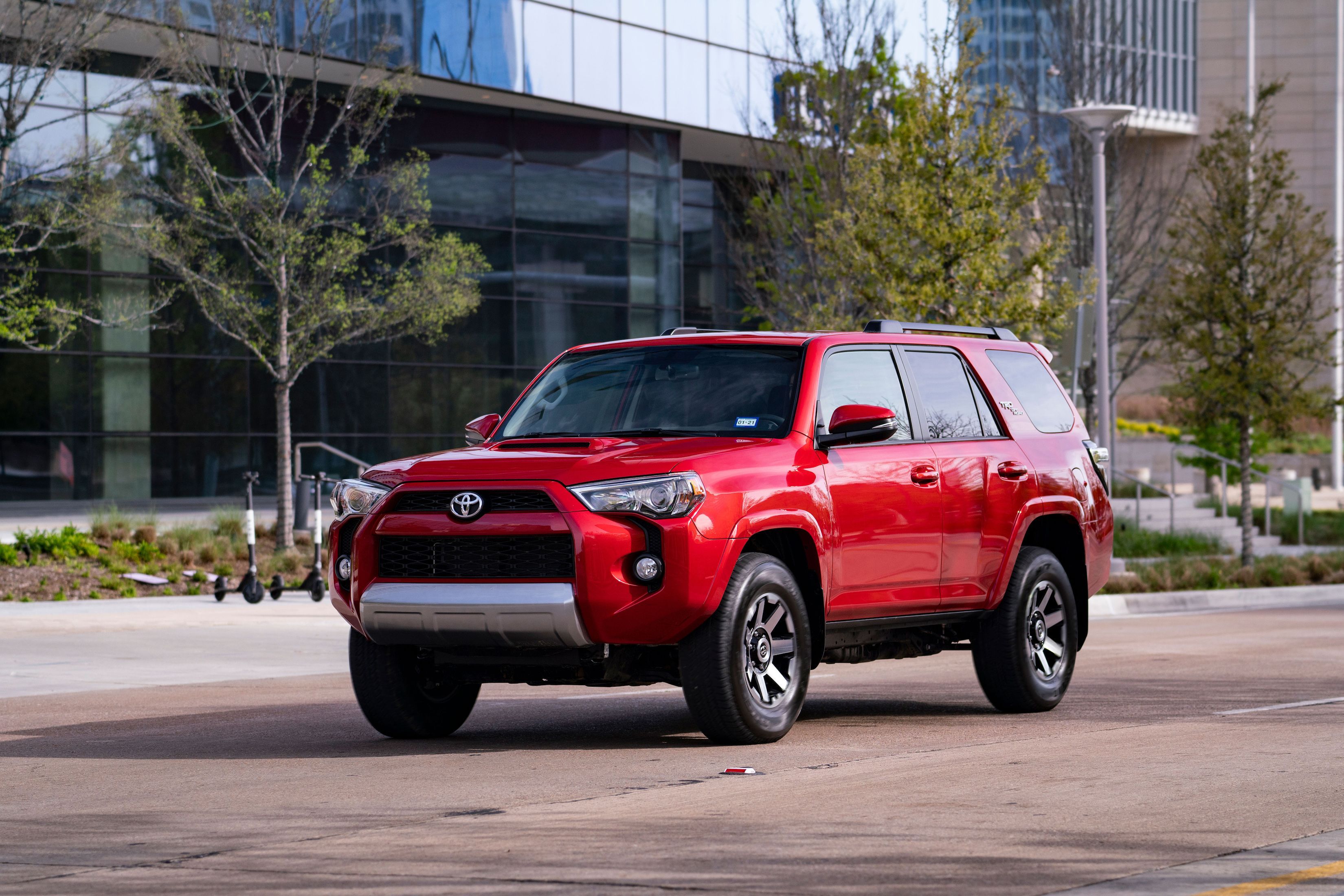
How Big is a Toyota 4Runner?

In today’s automotive market, SUVs (Sports Utility Vehicles) have gained immense popularity due to their versatility, spaciousness, and performance capabilities. One prominent SUV in this category is the Toyota 4Runner, known for its robust build and impressive off-road prowess. When considering a vehicle of this nature, understanding its dimensions is crucial, as it directly impacts its practicality and suitability for varied lifestyles and needs.

How Big is a Toyota 4Runner

Credit: www.caranddriver.com


Exterior Dimensions

Measuring the exterior dimensions of the Toyota 4Runner is essential for assessing its overall size and compatibility with your parking space, garage, or driving conditions. Let’s delve into the key exterior measurements:

Dimension Measurement
Length 191.3 inches
Width 75.8 inches
Height 71.5 inches
Wheelbase 109.8 inches

The 4Runner’s length of 191.3 inches provides ample space for passengers and cargo, while its width of 75.8 inches offers stability and road presence. The height of 71.5 inches, coupled with a wheelbase of 109.8 inches, contributes to its off-road capabilities and interior spaciousness, ensuring a comfortable ride for occupants even on challenging terrain.

Interior Dimensions

Stepping inside the Toyota 4Runner reveals a well-designed interior with generous space for occupants and cargo. Understanding the interior dimensions is crucial for evaluating its comfort and practicality:

Dimension Measurement
Front Headroom 39.3 inches
Rear Headroom 38.6 inches
Front Legroom 41.7 inches
Rear Legroom 32.9 inches
Cargo Space (behind 2nd row) 47.2 cubic feet
Cargo Space (behind 1st row) 89.7 cubic feet

The front headroom of 39.3 inches and front legroom of 41.7 inches provide a spacious and comfortable environment for the driver and front passenger. Meanwhile, the rear headroom of 38.6 inches and rear legroom of 32.9 inches ensure that rear-seat occupants enjoy a pleasant and accommodating ride. Additionally, the generous cargo space of 47.2 cubic feet behind the 2nd row and 89.7 cubic feet behind the 1st row allows for convenient storage of luggage, gear, and other items, making the 4Runner an ideal choice for travel, outdoor adventures, and everyday use.

Off-Road Dimensions

For those who seek adventure and off-road capabilities, understanding the off-road dimensions of the Toyota 4Runner is crucial. Let’s explore these vital measurements:

  • Ground Clearance: 9.6 inches
  • Approach Angle: 33 degrees
  • Departure Angle: 26 degrees
  • Breakover Angle: 23 degrees
  • Tire Size: 17- or 20-inch wheels

With a ground clearance of 9.6 inches, the 4Runner is well-equipped to navigate various off-road obstacles with ease. Its impressive approach angle of 33 degrees, departure angle of 26 degrees, and breakover angle of 23 degrees further enhance its off-road prowess, ensuring that it can tackle challenging terrains and obstacles efficiently. The choice of 17- or 20-inch wheels complements its off-road capabilities and allows for customization based on individual preferences and driving requirements.

How Big is a Toyota 4Runner

Credit: www.carsguide.com.au

Frequently Asked Questions On How Big Is A Toyota 4runner

How Big Is A Toyota 4runner?

The Toyota 4Runner is a midsize SUV with a length of approximately 190 inches, width of around 75 inches, and height of about 71 inches.

What Are The Seating Capacity And Cargo Space Of The Toyota 4runner?

The Toyota 4Runner typically comes with a seating capacity of 5 to 7 passengers, depending on the trim level chosen. In terms of cargo space, it offers around 47. 2 cubic feet behind the second row and up to 89.

7 cubic feet with the second row folded down.

What Is The Towing Capacity Of A Toyota 4runner?

The towing capacity of a Toyota 4Runner is impressive, with the ability to tow up to 5,000 pounds when properly equipped. This makes it a great choice for hauling small trailers, boats, or other recreational vehicles.

Conclusion

In conclusion, the Toyota 4Runner impresses with its substantial exterior dimensions, generous interior space, and formidable off-road capabilities. Whether you prioritize spaciousness, off-road prowess, or a combination of both, the 4Runner’s dimensions make it a compelling choice in the SUV market. Understanding these measurements allows you to assess its suitability for your lifestyle, driving needs, and adventure-seeking spirit, making it an SUV worth considering for your next vehicle purchase.