Recent Posts

Do New Cars Have Distributors


No, new cars do not have distributors.

In an era where technology leaps forward at breakneck speed, it's fascinating how some components of car design seem to straddle the past and the future. The truth is, as we shift from mechanical to electronic systems, the role and presence of distributors in new cars have greatly evolved.

Unpacking this change not only sheds light on the advancements in automotive technology but raises questions about what we can expect in the vehicles of tomorrow. Let's investigate this transformation together and uncover the intriguing fate of distributors in today's cars.

Evolution of Ignition Systems

advancements in ignition technology

How have ignition systems evolved to meet the demands of modern vehicles?

Historically, ignition systems relied heavily on distributor-based mechanisms to time and distribute the spark to each engine cylinder. However, as technology advanced, the automotive industry saw a significant shift toward more efficient and reliable systems. This evolution was primarily driven by the need for better fuel economy, reduced emissions, and improved performance.

Central to this transformation has been the advancement in spark plug technology and the adoption of coil on plug design. Spark plug technology has seen substantial improvements, focusing on materials that can withstand higher temperatures and pressures. This guarantees a more efficient combustion process, directly contributing to the vehicle's general performance and longevity.

Meanwhile, the coil on plug design represents a leap forward in ignition system architecture. By placing an individual ignition coil directly on top of each spark plug, this design eliminates the need for traditional spark plug wires. This not only reduces the potential for energy loss but also allows for more precise timing of the spark. The result is a more efficient and reliable ignition process, tailored to meet the sophisticated demands of modern engines.

The Role of the Distributor

Comprehending the evolution of ignition systems brings us to the role of the distributor, a component that once played a pivotal part in managing the timing and distribution of the spark in combustion engines. You'll find it fascinating how this device, with its mechanical and often vacuum advance mechanisms, had the responsibility of precisely timing the spark to ignite the air-fuel mixture in each cylinder, optimizing engine performance and efficiency.

Distributor maintenance and spark timing adjustments were important. Without proper care, your engine's performance could degrade, leading to inefficient fuel consumption and, at worst, engine misfires. Let's explore these aspects in more detail:

Aspect Importance Maintenance Required
Spark Timing Ensures optimal combustion timing Regular adjustments
Distributor Cap Protects and houses the distributor's components Inspection and cleaning
Rotor Directs the spark to the correct cylinder Replacement when worn out

This table underlines the technical precision required in handling a distributor. The fine balance between distributor maintenance and spark timing adjustments was an art, ensuring that each spark arrived just at the right moment. This art, rooted in mechanical skill and understanding, highlights the intricate dance of components that powered the engines of yesterday.

Modern Vehicles and Distributors

contemporary cars and dealerships

Nearly all modern vehicles have phased out the use of distributors, favoring more advanced ignition systems that offer superior performance and reliability. This shift has been largely driven by advancements in vehicle electronics and engine management technologies, which have revolutionized how engines operate and improve.

In the past, distributors played a vital role in directing the high voltage from the ignition coil to the spark plugs in the correct sequence. However, this mechanical system had its limitations, particularly regarding precision and efficiency. Today's engine management systems, on the other hand, utilize sophisticated electronics to control the timing and distribution of the ignition spark with greater accuracy, enhancing both performance and fuel efficiency.

Furthermore, the integration of electronic control units (ECUs) into vehicle systems has enabled a more refined and responsive engine management process. These ECUs can adjust ignition timing on the fly, responding to engine load, speed, and temperature to optimize performance. The result is a smoother, more efficient operation that noticeably reduces the likelihood of misfires or wasted fuel, issues that were more common with distributor-based systems.

Essentially, the evolution toward electronic ignition and engine management has rendered the traditional distributor obsolete in modern vehicles, marking a noteworthy leap forward in automotive technology.

Electronic Ignition Systems Explained

Electronic ignition systems, replacing traditional distributors, utilize advanced technologies to precisely control the timing and distribution of the ignition spark, markedly enhancing engine efficiency and performance. These systems rely on a combination of sensors and computerized control units to adjust spark timing, ensuring peak combustion at all engine speeds and conditions. You'll find the heart of this system is the ignition coil, a critical component that transforms the battery's low voltage into the thousands of volts necessary to create an ignition spark.

To give you a clearer picture, let's break down the key differences and advantages:

Feature Traditional Distributor Electronic Ignition
Timing Control Mechanically Adjusted Electronically Controlled
Efficiency Lower Higher
Maintenance Frequent Adjustments Required Minimal Maintenance
Spark Strength Can Weaken Over Time Consistently Strong
Durability Prone to Wear and Tear More Durable

As you can see, electronic ignition systems offer significant advantages over traditional distributors, particularly regarding spark timing precision and reduced maintenance. By leveraging an ignition coil and electronic control, these systems guarantee your vehicle operates at peak efficiency, translating to better fuel economy, more power, and a smoother ride.

The Future of Automotive Ignitions

advancements in automotive technology

Exploring the future of automotive ignitions reveals a landscape dominated by advancements in technology, promising even greater efficiency and performance for tomorrow's vehicles. You're witnessing a pivotal shift where traditional components like spark plugs and coil packs are undergoing substantial innovations. These components, crucial for generating the electric spark that ignites the fuel-air mixture in combustion engines, are at the forefront of this evolution.

Manufacturers are now leveraging materials science and electronic control systems to improve the durability and operational efficiency of spark plugs, ensuring they can withstand higher pressures and temperatures. This evolution reduces the need for frequent replacements, making your vehicle more reliable and efficient.

Simultaneously, coil packs, which have already replaced the distributor in most modern engines, are becoming smarter. They're being designed to adjust the spark timing with exceptional precision, optimizing combustion at all engine speeds and loads. This leap in technology not only increases engine performance but also significantly reduces emissions.

As you dig deeper into the future of automotive ignitions, it's clear that the focus is on maximizing efficiency and reducing environmental impact. The ongoing enhancements in spark plugs and coil packs are just the beginning of a much larger trend towards cleaner, more powerful engines that promise to redefine what you expect from your vehicle.

Conclusion

To sum up, the automotive world has largely moved past traditional distributors, embracing electronic ignition systems. These modern systems offer superior precision, efficiency, and reliability, marking a significant evolution from earlier ignition technologies.

As technology advances, we're seeing even more sophisticated approaches, including digital control over ignition timing. This shift not only improves performance but also aligns with the industry's push towards cleaner, more fuel-efficient vehicles.

The future of automotive ignitions, thus, lies in further digital integration and innovation.

How to Change Cabin Air Filter Toyota Corolla


Changing the cabin air filter in a Toyota Corolla involves several steps:

  • Locating it under the glove box
  • Removing the old filter
  • Installing a new one

This simple DIY task not only improves air quality but also saves money.

Identifying the Filter Location

locating filter s precise position

To replace the cabin air filter in a Toyota Corolla, find it behind the glove box. Open the glove box and release it fully to access the filter. This is often done by pressing down or unhooking a stop arm on the glove box's right side.

Once the glove box is down, you'll see the filter's housing with a removable cover. The cover might've clips or latches. The filter's exact location and how the housing is secured can vary by Corolla model year, so check your car's manual for specifics.

Gathering Necessary Tools

To replace the cabin air filter in your Toyota Corolla, you need some tools. Here's what you'll need:

  1. Screwdriver: You might need a Phillips or flat-head screwdriver. Some Corolla models use clips or latches that don't need tools, but have a screwdriver just in case.
  2. Flashlight: It can be dark behind the glove box, so use a flashlight or headlamp to see better.
  3. Gloves: Wear gloves to keep your hands clean and avoid cuts.
  4. New Cabin Air Filter: Make sure you have the right filter for your Corolla model. Check the size and shape before buying.

These tools help you change the filter quickly and without trouble.

Removing the Old Filter

updating air filter regularly

To replace the cabin air filter in a Toyota Corolla, first, make sure the car is off and parked safely.

Find the cabin air filter compartment, usually in the glove box or under the dashboard on the passenger side. You may need to empty the glove box to access it.

Next, remove the glove box by pressing its sides or unscrewing bolts, depending on the model year. Be careful not to break any plastic parts. After removing the glove box, you'll see the filter housing.

Open the housing cover by pressing or sliding its clips or latches. Then, pull out the old filter, noting its orientation for the new filter's installation. Dispose of the old filter properly.

The old cabin air filter is now removed.

Installing the New Filter

To install a new cabin air filter in a Toyota Corolla, follow these steps:

  1. Check the New Filter: Ensure the new cabin air filter is the same size and shape as the old one. Note the airflow direction indicated by arrows on the filter.
  2. Align the Filter Correctly: The airflow arrows on the filter should point towards the back of the car. If not aligned correctly, it could affect airflow.
  3. Insert the Filter into the Housing: Slide the new filter into its housing gently. If it doesn't fit easily, check its orientation and size again.
  4. Secure the Housing Cover: Put the housing cover back on. Ensure it's tightly closed to prevent unfiltered air from entering the cabin. This may involve clicking the cover into place or tightening screws, depending on the car model.

Maintenance Tips

maintenance for sewing machines

Maintain your Toyota Corolla's cabin air filter regularly to improve air quality inside your car. Check the filter every 15,000 to 20,000 miles, or more often in dusty areas or heavy traffic. To check, remove the filter and see if it's dirty. If so, replace it.

Use a high-quality replacement filter to ensure effective pollutant removal and to keep your car's HVAC system working well.

When installing a new filter, make sure it fits correctly. A bad fit means poor air filtering. Align it properly with the housing.

Before putting in a new filter, clean the housing compartment to remove dust. This keeps the filter clean and efficient.

Conclusion

To change the air filter in your Toyota Corolla, it's easy to do it yourself. First, find the filter behind the glove box. You'll need a new filter and maybe a screwdriver.

Take out the old filter carefully, remembering how it was put in. Then, put in the new filter the same way the old one was.

Changing your car's air filter often helps you breathe clean air and keeps your car working well. Great job keeping up with it!

How to Program Ford Garage Door Opener


How to Program Ford Garage Door Opener

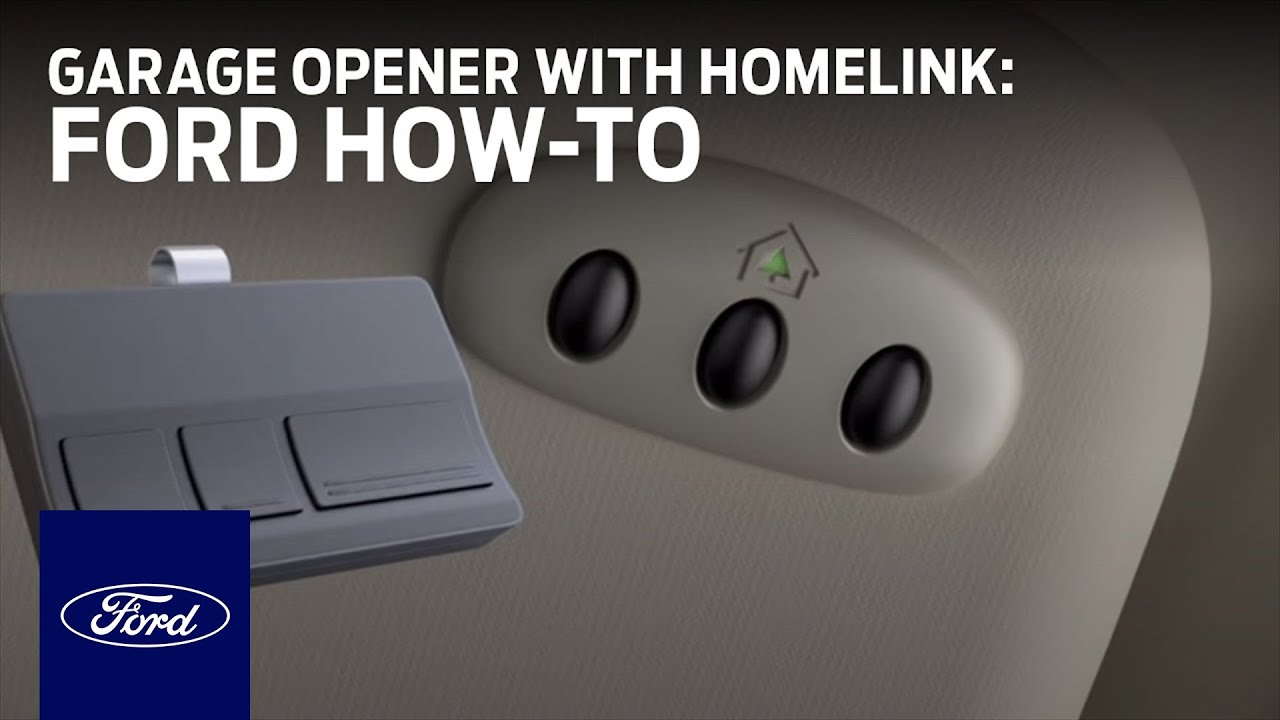
Are you looking to program your Ford garage door opener but not sure how to do it? Don’t worry, we’ve got you covered! In this article, we will guide you through the step-by-step process of programming your Ford garage door opener. By following these instructions, you’ll be able to easily open and close your garage door using your Ford vehicle’s HomeLink system.

How to Program Ford Garage Door Opener

Credit: www.youtube.com


Step 1: Prepare Your Garage Door Opener

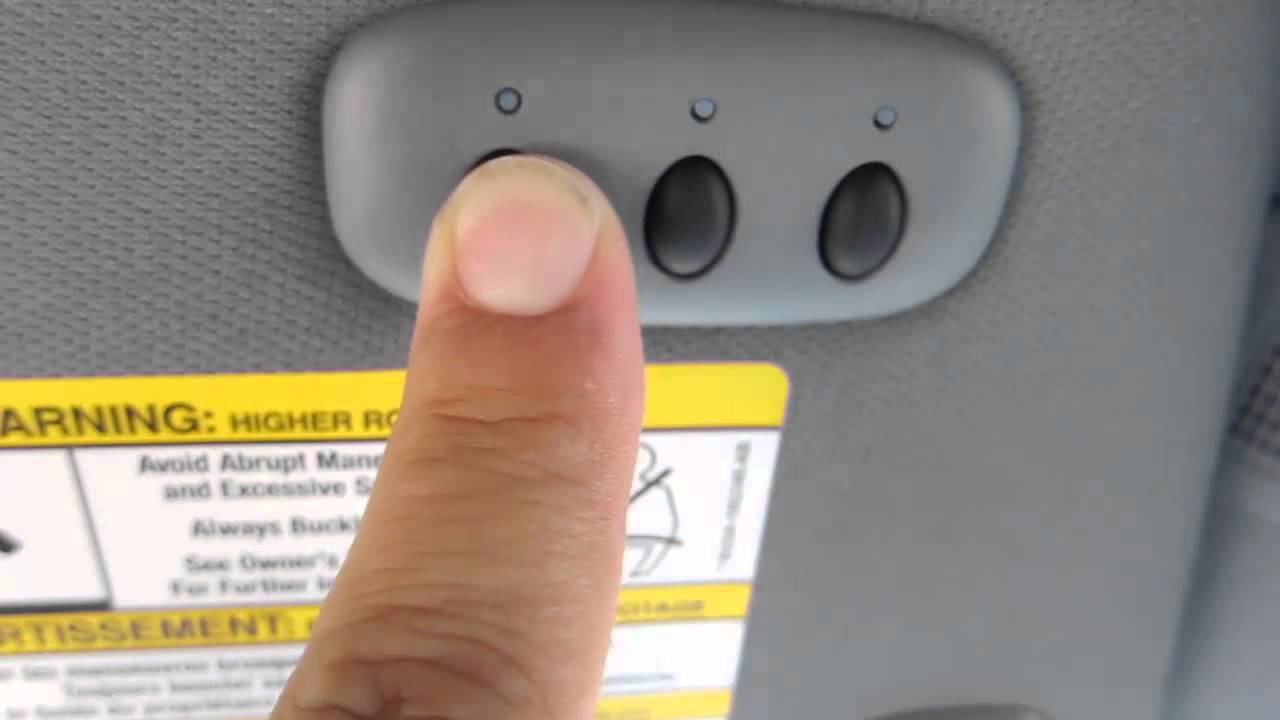
The first step is to locate the learn button on your garage door opener motor. This button is usually located near the antenna wire or the light cover. Press and hold the learn button to put your garage door opener in programming mode.

How to Program Ford Garage Door Opener

Credit: www.youtube.com

Step 2: Program Your Ford Vehicle’s HomeLink

Once your garage door opener is in programming mode, it’s time to program your Ford vehicle’s HomeLink system. Here’s how to do it:

  1. Get in your vehicle and turn on the ignition.
  2. Press and hold the desired function button on your HomeLink system for two seconds, then release it.
  3. Press and hold the same function button for two seconds again, then release it.

Repeat this step for the remaining function buttons on your HomeLink system if you want to program multiple garage doors.

Step 3: Sync Your Ford Vehicle with Your Garage Door Opener

Now that your Ford vehicle’s HomeLink system is programmed, it’s time to sync it with your garage door opener. Follow these steps:

  1. Press and hold the transmitter button on your garage door opener.
  2. While holding the transmitter button, press the corresponding function button on your HomeLink system that you want to use to open the garage door.
  3. Keep holding both buttons until the indicator light on your HomeLink system changes from a slow blink to a fast one.

Congratulations! You have successfully programmed your Ford vehicle’s HomeLink system to open your garage door. Now you can easily open and close your garage door with the press of a button.

Troubleshooting Tips

If you are having trouble programming your Ford garage door opener, here are some troubleshooting tips that might help:

  • Make sure you are within range of your garage door opener when programming your HomeLink system.
  • Check the batteries in your HomeLink system and replace them if necessary.
  • Refer to your vehicle’s owner’s manual for specific instructions or contact your Ford dealership for assistance.

By following these instructions and troubleshooting tips, you should be able to easily program your Ford garage door opener and enjoy the convenience of opening and closing your garage door with your vehicle’s HomeLink system.

Remember, if you have any specific questions or need further assistance, it’s always best to consult your vehicle’s owner’s manual or contact your local Ford dealership. They will be able to provide you with the most accurate and up-to-date information related to programming your Ford garage door opener.

Frequently Asked Questions For How To Program Ford Garage Door Opener

How Do I Connect My Ford Garage Door Opener To My Garage?

To connect your Ford garage door opener to your garage, follow these steps: 1. Press and hold the learn button on your garage door opener motor. 2. Get back in your car and press and hold the selected function button on your HomeLink for two seconds, then release it.

3. Press and hold the function button again for two seconds and release it. That’s it! Your Ford garage door opener should now be connected to your garage.

How Do I Program My 2023 Ford Garage Door Opener?

To program your 2023 Ford garage door opener, start by pressing and holding the learn button on your garage door opener motor. Then, get back in your car and press and hold the selected function button on your HomeLink for two seconds, then release it.

Repeat this step one more time.

How Do I Sync My Car To My Garage Door Opener?

To sync your car to your garage door opener, follow these steps: 1. Press and hold the learn button on your garage door opener motor. 2. Get back in your car and press and hold the selected function button on your HomeLink for two seconds, then release it.

3. Press and hold the HomeLink button for two seconds again and release it. Now your car should be synced with your garage door opener.

How To Reprogram Ford Key Fob Push Button Start


How to Program Ford Key Fob Push Button Start

Credit: www.caranddriver.com

Programming Ford Key Fob with Only One Key

If you have only one key and need to program it for push button start, follow the steps below:

  1. Ensure that all car doors are shut.
  2. Turn the key in the ignition from OFF to RUN quickly eight times.
  3. If successful, your door locks will cycle between lock and unlock.
  4. Take the Ford key fob you wish to program and press any button.

That’s it! Your Ford key fob is now programmed for push button start.

Programming Ford Key Fob without One Key

Don’t worry if you don’t have a spare key. You can still program your Ford key fob for push button start. Follow these steps:

  1. Visit a professional locksmith or authorized Ford dealership for assistance.
  2. They will use advanced programming tools to program your key fob.

It’s always recommended to seek professional help when programming a key fob without having a spare key.

How to Program Ford Key Fob Push Button Start

Credit: m.youtube.com

Programming Ford Key Fob for Fusion

If you own a Ford Fusion and want to program your key fob for push button start, follow the steps below:

  1. Ensure all car doors are shut.
  2. Insert the key into the ignition and turn it from OFF to RUN quickly eight times.
  3. If successful, the door locks will cycle between lock and unlock.
  4. Press any button on the key fob you want to program.

That’s it! Your key fob for your Ford Fusion is now programmed for push button start.

Frequently Asked Questions On How To Program Ford Key Fob Push Button Start

How Do You Program A Push Button Start On A Ford Key Fob?

To program a push button start on a Ford key fob, follow these steps:

1. Ensure all car doors are shut.

2. Quickly turn the key in the ignition from OFF to RUN, repeating this eight times.

3. If successful, the door locks will cycle between lock and unlock.

4. Take the Ford key fob you want to program and press any button. 5. The key fob should now be programmed and ready to use for push button start.

How Do You Reprogram A Push Start Key Fob?

To reprogram a push start key fob for a Ford vehicle, you can follow these steps. First, make sure all car doors are closed. Then, quickly turn the key in the ignition from OFF to RUN position eight times. If successful, the door locks will cycle between lock and unlock.

Finally, take the Ford key fob you want to program and press any button.

Can I Program A Ford Key Fob Myself?

Yes, you can program a Ford key fob yourself. Prepare the keys by following the instructions in programming videos available on YouTube. Make sure to have all car doors shut and turn the key in the ignition off to run quickly eight times.

If successful, the door locks will cycle. Take the Ford key fob you want to program and press any button. For more detailed instructions, visit Ford Parts Tips or consult with a locksmith for assistance.

How to Program Ford Key Fob Push Button Start with Only One Key

Programming a Ford key fob with push button start when you only have one key can be challenging, as most Ford vehicles require two working keys for self-programming. However, here are some options you can consider:

  1. Professional Programming:
    The most reliable option is to visit a Ford dealership or a professional locksmith. They have specialized equipment to program new key fobs even with only one working key.
  2. Remote Start Method:
    If your vehicle has a remote start feature, you might be able to use it as a second “key.” Start the car with remote start, then use your one working key to complete the programming process.
  3. Third-Party Programming Tools:
    Some aftermarket tools, like the Simple Key programmer, claim to allow programming with only one working key for certain Ford models. However, be cautious when using third-party tools, as they may not work for all vehicles and could potentially cause issues.
  4. FORScan Software:
    For some older Ford models, FORScan software might allow programming with one key. This method is generally not applicable to newer vehicles with push button start.
  5. Standard Programming Process (if you have two keys):
    While this doesn’t directly answer your question, it’s worth noting the general process for when you do have two keys:
  • Close all doors
  • Turn ignition from OFF to RUN 8 times within 10 seconds
  • The door locks will cycle to indicate programming mode
  • Press any button on the new key fob
  • Remove key from ignition to exit programming mode

For push button start vehicles:

  • Insert the first programmed key in the backup slot
  • Press the push button ignition switch
  • Wait 5 seconds, press the switch again
  • Remove the key and repeat with second programmed key
  • Insert unprogrammed key and press ignition switch

Remember, the exact process can vary depending on your specific Ford model and year. Always consult your vehicle’s manual for the most accurate instructions. If you’re unsure or unsuccessful, it’s best to seek professional help to avoid potential issues with your vehicle’s security system.

How to Reprogram Ford Key Fob Push Button Start UK

To reprogram a Ford key fob for a vehicle with push button start in the UK, follow these steps:

Enter Programming Mode:

  • Close all doors of your Ford vehicle.
  • Press the driver and passenger power door unlock control three times.
  • Push down and release the brake pedal once.
  • Repeat the process: press the door unlock controls three more times, then push and release the brake pedal once again.
  • The Start/Stop button indicator should flash rapidly, indicating you’ve entered programming mode.

Program the New Key:

  • Place the unprogrammed key fob in the center console pocket.
  • Ensure you have two previously programmed keys inside the vehicle.
  • Within one minute of entering programming mode, press the Start/Stop button.
  • A message should appear on the display indicating the new key has been programmed.

Exit Programming Mode:

  • Press the unlock button on the newly programmed key fob.
  1. Verify Functionality:
  • Test the new key fob to ensure it works properly.

Important Notes:

  • This method typically requires two previously programmed keys to be present in the vehicle.
  • If you only have one working key, you may need to visit a Ford dealership or a professional locksmith for programming.
  • The exact process can vary depending on your specific Ford model and year. Always consult your vehicle’s manual for the most accurate instructions.
  • If unsuccessful, consider using Ford’s FORScan software (for some older models) or seek professional help.

Alternative Options:

  • For some models, you might be able to use the remote start feature as a second “key” to aid in programming.
  • Third-party programming tools exist, but use caution as they may not work for all vehicles and could potentially cause issues.

If you’re unsure or uncomfortable with the process, it’s best to seek assistance from a Ford dealership or a qualified automotive locksmith to avoid potential issues with your vehicle’s security system.

Conclusion

Programming your Ford key fob for push button start is a simple process that can be done with or without a spare key. By following the steps outlined in this blog post, you can have your key fob programmed in no time.

Remember, if you’re unsure or need assistance, it’s always best to consult with a professional locksmith or authorized Ford dealership. They have the expertise and tools to ensure proper programming of your key fob.

Enjoy the convenience of push button start with your Ford key fob!


How to Clear Maintenance Light on Toyota Tacoma


To clear the maintenance light on a Toyota Tacoma, press and hold the trip meter reset knob while turning the key to the “on” position. This will reset the maintenance light and turn it off.

Keeping up with regular maintenance is essential for the longevity of your Toyota Tacoma. By following the manufacturer’s recommended service schedule and clearing the maintenance light when necessary, you can ensure that your truck runs smoothly and stays in optimal condition.

We will guide you on how to clear the maintenance light on your Toyota Tacoma, providing you with step-by-step instructions for a successful reset.

How to Clear Maintenance Light on Toyota Tacoma

Credit: m.youtube.com

Methods To Clear The Maintenance Light

When it comes to maintaining your Toyota Tacoma, clearing the maintenance light after completing a service task is a vital step to ensure the proper functioning of your vehicle. There are several methods to clear the maintenance light on a Toyota Tacoma, allowing you to reset the light and ensure it doesn’t interfere with the smooth operation of your vehicle. Let’s explore these methods to reset the maintenance light and keep your Toyota Tacoma in top condition.

Using The Trip Meter Reset Knob

To clear the maintenance light using the trip meter reset knob, keep the Trip Stem Button pressed and turn the key to the ‘on’ position. This will turn on all the lights on the instrument panel, including the maintenance light. You can release the Trip Stem Button when the odometer reading shows zero. The maintenance light should be reset by now and turned off.

Turning The Key To The ‘on’ Position

With the key in the Off position, hold the odometer button in. Then turn to the on position, it will count down then clear. The odometer needs to be cleared, which will reset the maintenance light.

How to Clear Maintenance Light on Toyota Tacoma

Credit: carbuzz.com

Resetting The Maintenance Light On Toyota Tacoma

To reset the maintenance light on a Toyota Tacoma, follow these steps: (i) Turn the key to the “on” position; (ii) Press and hold the Trip Stem Button until the odometer reads zero; (iii) Release the Trip Stem Button. The maintenance light should turn off, indicating a successful reset.

Step 1: Press And Hold The Trip Meter Reset Knob

To reset the maintenance light on your Toyota Tacoma, start by locating the trip meter reset knob, which is usually found on the dashboard near the speedometer. Press and hold the trip meter reset knob with your finger or a small tool. The trip meter reset knob is typically a small button that protrudes slightly from the dashboard.

Step 2: Turn The Key To The ‘on’ Position

Next, insert the key into the ignition and turn it to the ‘on’ position. This will activate the electrical system of your Tacoma, allowing you to access the necessary settings to reset the maintenance light. Ensure that the key is fully turned to the ‘on’ position before proceeding to the next step.

Step 3: Release The Trip Meter Reset Knob

While the key is in the ‘on’ position, continue to hold down the trip meter reset knob for a few more seconds. Then, release the knob. As you release the knob, you may notice that the maintenance light on the instrument panel comes on. This is a normal part of the resetting process and indicates that the system is resetting properly.

Step 4: The Maintenance Light Should Be Reset And Turned Off

After releasing the trip meter reset knob, check the instrument panel to see if the maintenance light has turned off. If it has, congratulations! You have successfully reset the maintenance light on your Toyota Tacoma. If the light is still on, repeat the previous steps carefully, ensuring that you fully complete each step of the process. By following these simple steps, you can easily reset the maintenance light on your Toyota Tacoma. It is important to note that resetting the maintenance light does not mean that the maintenance work itself has been performed. It simply means that the system has been reset, allowing you to start tracking the maintenance schedule again. Always consult your vehicle’s manual or a trusted mechanic for guidance on the appropriate maintenance procedures for your Toyota Tacoma.

Alternative Methods

Clearing the maintenance light on your Toyota Tacoma can be done through alternative methods if you prefer a visual guide or need specific instructions for your model. Below are two effective methods:

Using Youtube Tutorials

If you are a visual learner, YouTube tutorials can be your go-to resource for clearing the maintenance light on your Toyota Tacoma. There are several YouTubers who provide step-by-step instructions in an easy-to-follow format. Here’s a simple process you can follow:

  1. Access YouTube and search for “How to Clear Maintenance Light on Toyota Tacoma.”
  2. Watch multiple videos to find the most comprehensive and user-friendly tutorial.
  3. Follow along as the YouTuber demonstrates the process.
  4. Pause, rewind, and rewatch specific steps if needed to ensure accuracy.
  5. Once you have successfully completed the steps, the maintenance light on your Toyota Tacoma should be cleared.

Following Specific Instructions For Different Toyota Tacoma Models

Each Toyota Tacoma model may have slightly different instructions for clearing the maintenance light. To ensure you are following the correct steps for your specific model, here’s what you can do:

  1. Search on Google for “How to Clear Maintenance Light on [Insert Your Toyota Tacoma Model Year and Edition].”
  2. Look for reliable sources such as official Toyota websites, automotive forums, or reputable blogs.
  3. Read through the instructions carefully, noting any model-specific variations.
  4. Take your time and follow the provided steps precisely.
  5. Once you have completed the process accurately, the maintenance light on your Toyota Tacoma should be reset.

By utilizing YouTube tutorials and following specific instructions for your Toyota Tacoma model, you can confidently clear the maintenance light on your vehicle without the need for professional assistance. Remember to always stay focused, be patient, and ensure the accuracy of each step to achieve a successful result.

How to Clear Maintenance Light on Toyota Tacoma

Credit: www.jdpower.com

Frequently Asked Questions On How To Clear Maintenance Light On Toyota Tacoma

How Do You Reset The Maintenance Required Light On A Toyota Tacoma?

To reset the maintenance required light on a Toyota Tacoma, press and hold the trip meter reset knob next to the odometer. While holding the knob, turn the car on and off. The maintenance light should be reset and turned off.

How Do I Turn Off Maintenance Required Light On Toyota?

To turn off the maintenance required light on a Toyota, follow these steps: 1. Press and hold the trip meter reset nob next to the odometer. 2. While holding the nob, turn your car on and off. 3. Release the nob when the odometer reading shows zero.

4. The maintenance light should be reset and turned off.

How Do You Reset The Maintenance Light On A Toyota Im?

To reset the maintenance light on a Toyota IM, follow these steps: 1. Turn the key to the “on” position without starting the car. 2. Press and hold the trip meter reset button. 3. Continue holding until the odometer reading shows zero.

4. The maintenance light should be reset and turn off.

Conclusion

In just a few simple steps, you can easily reset the maintenance light on your Toyota Tacoma. Following these instructions will ensure that your vehicle is properly maintained, without the hassle of having to visit a mechanic. Take control of your vehicle’s maintenance and keep it running smoothly for years to come.


U1001 2012 Nissan Altima Sedan Meaning, Symptoms, Causes and How to Fix


Over 90% of Nissan Altima owners rave about their ride’s reliability and comfort, but even the best cars have their model-specific quirks. The u1001 2012 Nissan Altima sedan is no exception, blending sleek design with performance that stands out in its class.

However, understanding its unique features and potential issues is crucial for any owner or prospective buyer.

This post dives into what makes the u1001 2012 Nissan Altima sedan a noteworthy choice for sedan enthusiasts, from its engine performance to interior comforts, while also touching on common concerns to keep an eye out for.

Decoding U1001 Nissan Code

U1001 Meaning

The U1001 code appears when there’s a communication problem within the CAN of Nissan vehicles. This issue signals that electronic systems in the car might not talk to each other properly.

When this code pops up, it’s crucial to act fast. Ignoring it can lead to poor vehicle performance or even safety risks. The car depends on these communications for everything from engine operation to airbag deployment.

CAN Significance

The Controller Area Network (CAN) is the vehicle’s backbone for electronic communication. It allows various parts of the car to share information quickly and efficiently.

Without a fully functional CAN, critical systems may fail. These include the engine control unit, anti-lock brakes, and airbags. Thus, understanding and fixing a U1001 code is vital for your Nissan’s health.

Immediate Action

Addressing the U1001 code should be a priority. First, a professional mechanic can diagnose the issue accurately. They will check if it’s a simple wiring problem or something more serious.

Next, repairing any found issues promptly will ensure your Nissan remains safe and reliable. Remember, regular maintenance can prevent these problems from occurring in the first place.

Symptoms of U1001 Code

Check Engine

The check engine light might suddenly turn on. This is a common signal that something is wrong. Drivers may notice this light first before any other symptom.

Dashboard Lights

Dashboard lights could behave erratically. For instance, they might flicker or not display correctly. This confuses drivers about the actual status of their car.

Vehicle Performance

Unexpected vehicle performance issues are telltale signs. The car might feel sluggish or not as responsive. Sometimes, acceleration might not be smooth.

Starting Problems

Intermittent issues with starting the vehicle are another symptom. Owners may find their car refuses to start on some occasions but works fine at other times.

Power Loss

Drivers could experience sudden power loss during operation. This is not only alarming but can be dangerous if it happens while driving.

Electronic Components

Unusual behaviors in electronic components, like the radio or navigation system, may occur. These devices might restart randomly or fail to work as expected.

Common Causes of U1001 Code

Damaged Wiring

The network of wires in your car is like the veins in our body. They need to be healthy for everything to work right. For the 2012 Nissan Altima Sedan, damaged wiring or loose connections in the Controller Area Network (CAN) are often why you see a U1001 code.

Problems can start small. Maybe it’s just a wire that’s come loose. Or, it could be more serious, like a wire that’s broken or corroded. These issues stop the different parts of your car from talking to each other properly.

Faulty Units

Your car has several control units that act like its brain. The Engine Control Module (ECM) and Transmission Control Module (TCM) are two big ones. If they’re not working right, your car will tell you with codes like U1001.

etimes these units get damaged or wear out over time. This can cause communication problems within your car’s network.

Aftermarket Installations

We all want to make our cars better. But sometimes, adding new electronic gadgets can cause trouble. Aftermarket installations might interfere with your car’s electronic system.

This interference can confuse your car’s network. It might think there’s a problem when there isn’t one. Or worse, it could hide real issues by causing the U1001 code to pop up.

Diagnosing U1001 Code Issues

Professional Tools

Professional diagnostic tools are essential in pinpointing the root cause of a U1001 code. These tools go beyond basic scanners, providing deep insights into the vehicle’s communication system. They analyze data from various connectors and computer systems. This depth of analysis is crucial because U1001 indicates a general communication failure that can stem from multiple sources.

Using the right tools can save time and ensure accuracy in diagnosis. It prevents unnecessary repairs on components that might not be faulty.

Expert Help

Consulting with a qualified technician, especially one experienced with Nissan vehicles, is highly recommended. Experts in this field have seen numerous cases and can offer invaluable advice. Their experience allows them to recognize patterns and common issues specific to the model.

A skilled technician can also answer emergency questions and guide you through the diagnosis process. This client relationship builds trust and ensures proper handling of the issue.

Vehicle History

Checking the vehicle’s history for any previous instances of the U1001 code is beneficial. Past occurrences can provide clues to recurring problems or indicate if a previous repair did not fully resolve the issue.

This information helps narrow down potential causes, making the diagnostic process more efficient. It’s an often-overlooked step that can significantly aid in troubleshooting.

Fixing U1001 Code in Nissan

Wire Repair

Repairing or replacing damaged wires and connectors often fixes the U1001 code. This issue usually stems from faulty wiring in the vehicle’s communication network. Mechanics should carefully inspect all related circuits. If they find any signs of wear or damage, immediate action is necessary.

Technicians might need to solder new wires or replace entire sections of wiring. This ensures clear signals between the car’s electronic systems.

Module Update

etimes, the solution involves updating or reprogramming vehicle control modules. Outdated software can lead to miscommunication errors like U1001. Specialized equipment updates these modules.

This process requires precise knowledge of the car’s system. It ensures that all parts “speak” the same language again, eliminating error codes.

Expert Consultation

Consulting with certified Nissan technicians is crucial for these repairs. They understand your car’s specific needs.

Certified mechanics have access to Nissan-specific tools and information. This guarantees that any replacement parts fit perfectly and work as intended. Their expertise prevents further issues down the line.

Cost Estimates for U1001 Repairs

Diagnosis Costs

Diagnosing the U1001 code in a 2012 Nissan Altima Sedan can vary. Some repair shops might charge an hour of labor, while others could ask for more. The cost largely depends on the shop’s hourly rate and your car’s condition.

Prices might range from $75 to $150. Remember, this is just for finding out what’s wrong. It does not include fixing the issue.

Repair Expenses

After diagnosing, fixing the problem is next. Common repairs involve wiring fixes or replacing modules. These can get pricey.

For wiring repairs, costs could start at $100 and go up based on complexity. Module replacements are more expensive. They can easily exceed $500, especially if parts are hard to find or if you choose dealership services over a local repair shop.

Shopping Around

Costs can vary significantly based on location and the repair shop’s reputation. It’s wise to get quotes from multiple professionals. This ensures you’re getting a fair price.

Preventing U1001 Code Recurrence

Regular Maintenance

Regular vehicle checks are key. They help catch issues early, preventing major problems. This includes checking the electronic system often.

Keeping up with maintenance schedules prevents many issues. It ensures your car stays in top shape, avoiding unexpected repairs.

Avoid Modifications

Unauthorized installations can harm your car’s electronics. These aftermarket parts may interfere with the vehicle’s systems, causing the U1001 code to appear.

It’s best to avoid these modifications. They might seem like upgrades but could lead to bigger problems with your Nissan Altima’s communication systems.

Software Updates

Keeping your vehicle’s software updated is crucial. Authorized Nissan service centers offer updates that keep your car running smoothly.

These updates can fix bugs and improve your car’s performance. They also prevent communication issues that trigger the U1001 code.

Closing Thoughts

Dealing with a U1001 code in your 2012 Nissan Altima Sedan might seem daunting, but you’ve got this. We’ve walked through what this code means, its symptoms, causes, and how to diagnose and fix it. You also know the costs involved and how to stop it from popping up again. Keeping your ride smooth and trouble-free is all about staying informed and proactive. Remember, tackling car troubles head-on saves you time and money in the long run.

Now’s the time to roll up your sleeves and get your Nissan back in top shape. Whether you’re diving into repairs yourself or chatting with a pro, you’re well-equipped with the knowledge to handle it. Got questions or need a hand? Reach out to a trusted mechanic or hit up online forums for advice. Keep your Nissan running like a dream!

Frequently Asked Questions

What does the U1001 code mean for a 2012 Nissan Altima Sedan?

The U1001 code indicates a communication issue between the Engine Control Module (ECM) and other control modules in your 2012 Nissan Altima Sedan.

What are common symptoms of a U1001 code in a Nissan?

Symptoms include engine light on, reduced fuel efficiency, and sometimes issues with starting the vehicle or erratic behavior of dashboard instruments.

What causes a U1001 code to appear in my Nissan?

Common causes include faulty wiring or connections, bad control modules, or issues within the CAN (Controller Area Network) bus communication system.

How do professionals diagnose U1001 code issues in Nissans?

Technicians use specialized diagnostic tools to check the communication between the ECM and other modules, inspecting for wiring problems and testing module functionality.

What’s involved in fixing a U1001 code in a Nissan Altima?

Fixes can range from repairing damaged wires, replacing faulty modules, to updating software within the vehicle’s computer systems.

How much does it typically cost to repair a U1001 code issue?

Costs vary widely based on the root cause but can range from $150 for minor repairs to over $1000 for extensive electrical work or module replacements.

Can I prevent U1001 code recurrence in my Nissan?

Regular vehicle maintenance and promptly addressing any electrical issues can help prevent future occurrences of the U1001 code.